E-mail
FeaturesThe SOAP component is a Binding Component (BC) which enables to interact with external SOAP Web Services and to expose JBI services as SOAP Web Services. In provider role, when a JBI MessageExchange is sent to a ServiceEndpoint (mapped to a Web Service), it is transformed into a SOAP message and sent to the linked external Web Service. In consumer role, when a SOAP message is received on an exposed Web Service, it is transformed into a JBI MessageExchange and sent to the corresponding JBI ServiceEndpoint. The SOAP component is based on Apache Axis2 v1.4.1 (http://ws.apache.org/axis2/) and Mortbay Jetty v6.1.9 (http://jetty.codehaus.org/jetty/). It provides the following features:
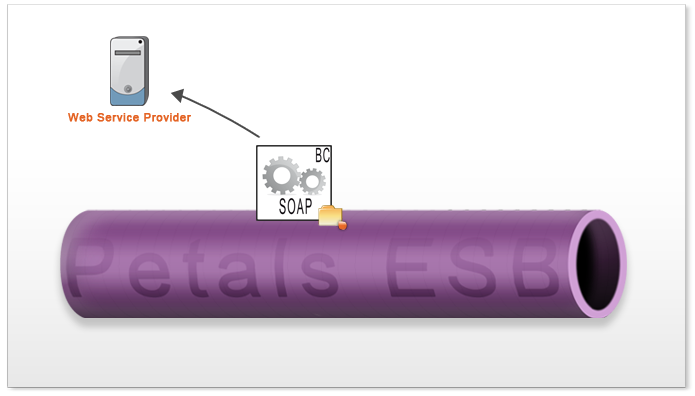
Provide a Web Service in the ESB (SOAP over HTTP)In provide mode, the component exposes an external Web Service in the JBI environment to send SOAP requests to the external Web Service. UsageThe SOAP component can expose an external Web Service as a JBI service endpoint by deploying a Service Unit on it:
When a message is received on a SOAP linked endpoint from the JBI environment, it is transformed into a SOAP message and sent to the Web Service. The address of the Web Service to send the SOAP message to is defined in the address extension of the deployed Service Unit. The SOAP message is created like this:
The external Web Service is called and the SOAP response is processed and returned to the JBI environment. ConfigurationConfiguration of a Service Unit to provide a service (JBI)
Configuration of a Service Unit to provide a service (CDK)
Configuration of a Service Unit to provide a service (SOAP)
Service Unit descriptorThe service unit is configurable via its extensions in the jbi.xml file: <?xml version="1.0" encoding="UTF-8"?> <jbi:jbi version="1.0" xmlns:generatedNs="http://petals.ow2.org/" xmlns:jbi="http://java.sun.com/xml/ns/jbi" xmlns:petalsCDK="http://petals.ow2.org/components/extensions/version-5" xmlns:soap="http://petals.ow2.org/components/soap/version-4" xmlns:xsi="http://www.w3.org/2001/XMLSchema-instance"> <jbi:services binding-component="true"> <jbi:provides interface-name="generatedNs:IntegrationService" service-name="generatedNs:IntegrationService" endpoint-name="IntegrationServiceSOAP"> <!-- CDK specific elements --> <petalsCDK:timeout>1000</petalsCDK:timeout> <petalsCDK:validate-wsdl>true</petalsCDK:validate-wsdl> <petalsCDK:forward-security-subject>false</petalsCDK:forward-security-subject> <petalsCDK:forward-message-properties>false</petalsCDK:forward-message-properties> <petalsCDK:forward-attachments>false</petalsCDK:forward-attachments> <petalsCDK:wsdl>IntegrationService.wsdl</petalsCDK:wsdl> <!-- Component specific elements --> <soap:address>http://localhost:8088/mockIntegrationServiceSOAP</soap:address> <soap:soap-version>1.1</soap:soap-version> <soap:chunked-mode>false</soap:chunked-mode> <soap:cleanup-transport>true</soap:cleanup-transport> <soap:mode>SOAP</soap:mode> </jbi:provides> </jbi:services> </jbi:jbi> Service Unit contentThe Service Unit has to contain the following elements, packaged in an archive:
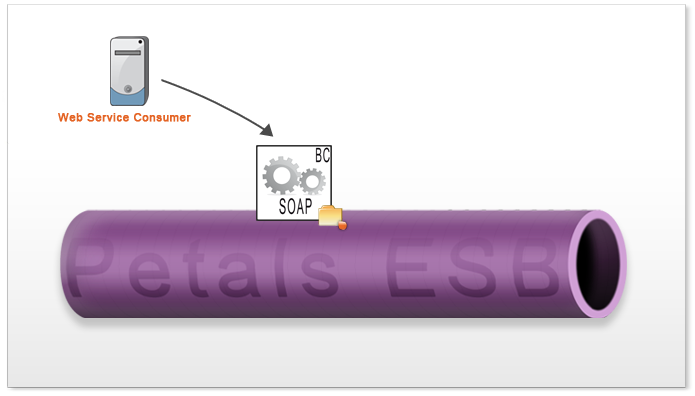
Exposing an internal JBI service endpoint as a SOAP Web Service (SOAP over HTTP)In consumer mode, the component exposes an internal JBI service outside the bus to transfer incoming SOAP requests to the internal service. UsageThe petals-bc-soap component can listen incoming SOAP messages and send messages to a JBI service endpoint by deploying a Service Unit on it. The component consumes the JBI service:
The service-name Service Unit extension value will be used as Axis2 service name. When a SOAP message is handled by the component, it is transformed into a JBI Message and sent to the JBI service endpoint configured in the Service Unit. The JBI message is created like this:
By default, the component is configured to handle URI with the http://localhost:8084/petals/services/<service-name> pattern (this URI can be configured in the [SOAP component configuration]). It also handles ?wsdl calls; the WSDL description is retrieved from the endpoint and sent back to the consumer. By default, the list of services is available at http://localhost:8084/petals/services/listServices URI (it can also be configured in the [SOAP component configuration]).
ConfigurationConfiguration of a Service Unit to consume a service (JBI)
Configuration of a Service Unit to consume a service (CDK)
Service Unit attributes to consume services
Service Unit descriptorThe service unit is configurable via its extensions in the jbi.xml file: <?xml version="1.0" encoding="UTF-8"?> <jbi:jbi version="1.0" xmlns:generatedNs="http://petals.ow2.org/" xmlns:jbi="http://java.sun.com/xml/ns/jbi" xmlns:petalsCDK="http://petals.ow2.org/components/extensions/version-5" xmlns:soap="http://petals.ow2.org/components/soap/version-4" xmlns:xsi="http://www.w3.org/2001/XMLSchema-instance"> <jbi:services binding-component="true"> <jbi:consumes interface-name="generatedNs:IntegrationService" service-name="generatedNs:IntegrationService" endpoint-name="IntegrationServiceSOAP"> <!-- CDK specific elements --> <petalsCDK:timeout>500</petalsCDK:timeout> <petalsCDK:mep xsi:nil="true" /> <!-- Component specific elements --> <soap:address>IntegrationServiceSOAPByPetals</soap:address> <soap:mode>SOAP</soap:mode> <soap:enable-http-transport>true</soap:enable-http-transport> <soap:enable-jms-transport>false</soap:enable-jms-transport> </jbi:consumes> </jbi:services> </jbi:jbi> Service Unit contentThe Service Unit has to contain the following elements, packaged in an archive:
Exposing an external RESTful Web Service as a JBI service endpoint (REST)In provide mode, the component exposes an external Web Service in the JBI environment to send REST requests to the external Web Service.
UsageThe petals-bc-soap component can expose an external Web Service as a JBI service endpoint by deploying a Service Unit on it:
When a message is received on a REST linked endpoint from the JBI environment, it is transformed into a REST message and sent to the Web Service. The address of the Web Service to send the REST message to is defined in the address extension of the deployed Service Unit. The REST message is created like this:
The external Web Service is called and the REST response is processed and returned to the JBI environment. The address extension can be configured with placeholders. The placeholder will be replaced by the result of the XPath expression defined inside of the placeholder. The XPath expression is performed on the content of the incoming JBI message. The placeholders will be replaced in the address extension to build the final URI according to the result of the XPath expression. For example the following JBI message: <weat:getWeather xmlns:weat="http://petals.ow2.org/services/weather"> <citycode>FRXX0099</citycode> <unit>c</unit> </weat:getWeather> is associated with the address parameter value:
http://weather.yahooapis.com/forecastrss?p={/*[localname()='getWeather'][1]/*[local-name()='citycode']
[1]}&u={/*[local-name()='getWeather'][1]/*[local-name()='unit'][1]}
and produces the URI http://weather.yahooapis.com/forecastrss?p=FRXX0099&u=c. The JBI message response returned by the Yahoo Weather REST service corresponding to the previous URI is: <rss version="2.0" xmlns:yweather="http://xml.weather.yahoo.com/ns/rss/1.0" xmlns:geo="http://www.w3.org/2003/01/geo/wgs84_pos#"> <channel> <title>Yahoo! Weather - Toulouse, FR</title> <link>http://us.rd.yahoo.com/dailynews/rss/weather/Toulouse__FR/*http://weather.yahoo.com/forecast/ FRXX0099_c.html</link> <description>Yahoo! Weather for Toulouse, FR</description> <language>en-us</language> <lastBuildDate>Thu, 06 Mar 2008 3:00 pm CET</lastBuildDate> <ttl>60</ttl> <yweather:location city="Toulouse" country="FR" region=""/> <yweather:units distance="km" pressure="mb" speed="kph" temperature="C"/> <yweather:wind chill="3" direction="310" speed="37"/> <yweather:atmosphere humidity="37" pressure="0" rising="0" visibility="999"/> <yweather:astronomy sunrise="7:22 am" sunset="6:50 pm"/> <image> <title>Yahoo! Weather</title> <width>142</width> <height>18</height> <link>http://weather.yahoo.com/</link> <url>http://l.yimg.com/us.yimg.com/i/us/nws/th/main_142b.gif</url> </image> <item> <title>Conditions for Toulouse, FR at 3:00 pm CET</title> <geo:lat>43.61</geo:lat> <geo:long>1.45</geo:long> <link>http://us.rd.yahoo.com/dailynews/rss/weather/Toulouse__FR/*http://weather.yahoo.com/forecast/ FRXX0099_c.html</link> <pubDate>Thu, 06 Mar 2008 3:00 pm CET</pubDate> <yweather:condition code="28" date="Thu, 06 Mar 2008 3:00 pm CET" temp="8" text="Mostly Cloudy"/> <description> <![CDATA[<img src="http://l.yimg.com/us.yimg.com/i/us/we/52/28.gif" /><br /> <b>Current Conditions:</b><br /> Mostly Cloudy, 8 C<BR /><BR /> <b>Forecast:</b><BR /> Thu - Mostly Cloudy. High: 10 Low: 4<br /> Fri - Cloudy. High: 10 Low: 4<br /> <br /> <a href="http://us.rd.yahoo.com/dailynews/rss/weather/Toulouse__FR/*http://weather.yahoo.com/forecast/ FRXX0099_c.html">Full Forecast at Yahoo! Weather</a><BR/> (provided by The Weather Channel)<br/>]]> </description> <yweather:forecast code="27" date="06 Mar 2008" day="Thu" high="10" low="4" text="Mostly Cloudy"/> <yweather:forecast code="26" date="07 Mar 2008" day="Fri" high="10" low="4" text="Cloudy"/> <guid isPermaLink="false">FRXX0099_2008_03_06_15_0_CET</guid> </item> </channel> </rss> ConfigurationConfiguration of a Service Unit to provide a service (JBI)
Configuration of a Service Unit to provide a service (CDK)
Service Unit attributes to provide services
Service Unit descriptorThe service unit is configurable via its extensions in the jbi.xml file: <?xml version="1.0" encoding="UTF-8"?> <jbi:jbi version="1.0" xmlns:generatedNs="http://petals.ow2.org/GenericREST/" xmlns:jbi="http://java.sun.com/xml/ns/jbi" xmlns:petalsCDK="http://petals.ow2.org/components/extensions/version-5" xmlns:soap="http://petals.ow2.org/components/soap/version-4" xmlns:xsi="http://www.w3.org/2001/XMLSchema-instance"> <jbi:services binding-component="true"> <jbi:provides interface-name="generatedNs:RestInterface" service-name="generatedNs:YahooWeather" endpoint-name="YahooWeatherEndpoint"> <!-- CDK specific elements --> <petalsCDK:timeout>30000</petalsCDK:timeout> <petalsCDK:validate-wsdl>true</petalsCDK:validate-wsdl> <petalsCDK:forward-security-subject>false</petalsCDK:forward-security-subject> <petalsCDK:forward-message-properties>false</petalsCDK:forward-message-properties> <petalsCDK:forward-attachments>false</petalsCDK:forward-attachments> <petalsCDK:wsdl>RestService.wsdl</petalsCDK:wsdl> <!-- Component specific elements --> <soap:address>http://weather.yahooapis.com/forecastrss?p={/*[local-name()='getWeather'][1]/*[local-name()='citycode'][1]}&u={/*[local-name()='getWeather'][1]/*[local-name()='unit'][1]}</soap:address> <soap:mode>REST</soap:mode> </jbi:provides> </jbi:services> </jbi:jbi> Service Unit contentThe Service Unit has to contain the following elements, packaged in an archive:
Exposing an internal JBI service endpoint as a RESTful Web Service (REST)In consumer mode, the component exposes an internal JBI service outside the bus to transfer incoming REST requests to the internal service. UsageThe petals-bc-soap component can listen incoming REST messages and send messages to a JBI service endpoint by deploying a Service Unit on it. The component consumes the JBI service:
The service-name Service Unit extension value will be used as Axis2 service name. When a REST message is handled by the component, it is transformed into a JBI Message and sent to the JBI service endpoint configured in the Service Unit. The JBI message is created like this:
By default, the component is configured to handle URI with the http://localhost:8084/petals/services/<service-name> pattern (this URI can be configured in the [SOAP component configuration]). It also handles ?wsdl calls; the WSDL description is retrieved from the endpoint and sent back to the consumer. ConfigurationConfiguration of a Service Unit to consume a service (JBI)
Configuration of a Service Unit to consume a service (CDK)
Service Unit attributes to consume services
Service Unit descriptorThe service unit is configurable via its extensions in the jbi.xml file: <?xml version="1.0" encoding="UTF-8"?> <jbi:jbi version="1.0" xmlns:generatedNs="http://petals.ow2.org/" xmlns:jbi="http://java.sun.com/xml/ns/jbi" xmlns:petalsCDK="http://petals.ow2.org/components/extensions/version-5" xmlns:soap="http://petals.ow2.org/components/soap/version-4" xmlns:xsi="http://www.w3.org/2001/XMLSchema-instance"> <jbi:services binding-component="true"> <jbi:consumes interface-name="generatedNs:IntegrationService" service-name="generatedNs:IntegrationService" endpoint-name="IntegrationServiceSOAP"> <!-- CDK specific elements --> <petalsCDK:timeout>30000</petalsCDK:timeout> <petalsCDK:mep xsi:nil="true" /> <!-- Component specific elements --> <soap:address>RESTService</soap:address> <soap:mode>REST</soap:mode> <soap:rest-add-namespace-uri>http://petals.ow2.org/</soap:rest-add-namespace-uri> <soap:rest-add-namespace-prefix>ns1</soap:rest-add-namespace-prefix> </jbi:consumes> </jbi:services> </jbi:jbi> Service Unit contentThe Service Unit has to contain the following elements, packaged in an archive:
SOAP over JMSBy configuring the SOAP component and a Service Unit, it is possible to consume an internal JBI service.
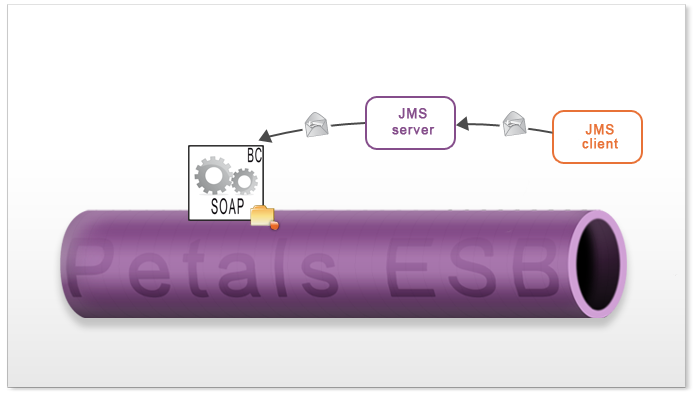
UsageThe petals-bc-soap component can receive JMS messages from a JMS queue and send SOAP messages (contained in the JMS body message) to a JBI service endpoint by deploying a Service Unit on it. The component consumes the JBI service. It enables to support the following scenario: A JMS publisher sends a message to a JMS server and the SOAP component consumes the JMS message which contains a SOAP envelope in its body:
The service-name Service Unit extension value will be used as Axis2 service name. When a JMS message is handled by the component, the SOAP envelope (in its body) is extracted by Axis, is transformed into a JBI Message and sent to the JBI service endpoint configured in the Service Unit. The JBI message is created like this:
ConfigurationJMS serverA JMS server must be started before starting the BC SOAP component (if the JMS transport layer is configured). The compatible JMS servers are Joram and Apache ActiveMQ. Shared libraryA shared library corresponding to the JMS server (SL-JMS-Joram or SL-JMS-ActimeMQ) must be installed in Petals ESB before installing the BC SOAP component in Petals ESB. Component descriptorThe JMS transport layer must be set in the component jbi.xml file (cf [SOAP component configuration]): <?xml version="1.0" encoding="UTF-8"?> <jbi:jbi version="1.0" xmlns:jbi="http://java.sun.com/xml/ns/jbi" xmlns:xsi="http://www.w3.org/2001/XMLSchema-instance" xmlns:petalsCDK="http://petals.ow2.org/components/extensions/version-5" xmlns:soap="http://petals.ow2.org/components/soap/version-4"> <jbi:component type="binding-component" bootstrap-class-loader-delegation="parent-first"> <jbi:identification> <jbi:name>petals-bc-soap</jbi:name> <jbi:description>The SOAP Binding Component (based on Axis2 + Jetty)</jbi:description> </jbi:identification> ... <!-- SOAP Component Parameters --> ... <!-- JMS transport layer --> <soap:java-naming-factory-initial>org.apache.activemq.jndi.ActiveMQInitialContextFactory</soap:java-naming-factory-initial> <soap:java-naming-provider-url>tcp://localhost:61616</soap:java-naming-provider-url> <soap:jms-connection-factory-jndiname>QueueConnectionFactory</soap:jms-connection-factory-jndiname> </jbi:component> </jbi:jbi> Service Unit descriptorThe JMS transport must be enabled in the Service Unit jbi.xml file: <?xml version="1.0" encoding="UTF-8"?> <jbi:jbi version="1.0" xmlns:generatedNs="http://petals.ow2.org/" xmlns:jbi="http://java.sun.com/xml/ns/jbi" xmlns:petalsCDK="http://petals.ow2.org/components/extensions/version-5" xmlns:soap="http://petals.ow2.org/components/soap/version-4" xmlns:xsi="http://www.w3.org/2001/XMLSchema-instance"> <!-- Import a Service into Petals or Expose a Petals Service => use a BC. --> <jbi:services binding-component="true"> <!-- Expose a Petals Service => consumes a Service. --> <jbi:consumes interface-name="generatedNs:JMSService" service-name="generatedNs:JMSService" endpoint-name="JMSServiceSOAP"> ... <soap:enable-jms-transport>true</soap:enable-jms-transport> </jbi:consumes> </jbi:services> </jbi:jbi> When the SU is started, a queue is created on the JMS server by the SOAP component if it does not exist. The name of the queue is the value of the parameter soap:address or soap:service-name. When a message is sent to the JMS queue, it is received and treated by the SOAP component. Component ConfigurationThe following attributes can be set during the installation phase to configure the component, using the params element of the jbi-install-component ANT task:
Unable to render {include} Couldn't find a page to include called: 0 CDK Component Configuration Table
Definition of CDK parameter scope :
Component descriptorThe component is configurable via its extensions in the jbi.xml file: <?xml version="1.0" encoding="UTF-8"?> <jbi:jbi version="1.0" xmlns:jbi="http://java.sun.com/xml/ns/jbi" xmlns:xsi="http://www.w3.org/2001/XMLSchema-instance" xmlns:petalsCDK="http://petals.ow2.org/components/extensions/version-5" xmlns:soap="http://petals.ow2.org/components/soap/version-4"> <jbi:component type="binding-component" bootstrap-class-loader-delegation="parent-first"> <jbi:identification> <jbi:name>petals-bc-soap</jbi:name> <jbi:description>The SOAP Binding Component (based on Axis2 + Jetty)</jbi:description> </jbi:identification> <jbi:component-class-name>org.ow2.petals.binding.soap.SoapComponent</jbi:component-class-name> <jbi:component-class-path><jbi:path-element/></jbi:component-class-path> <jbi:bootstrap-class-name>org.ow2.petals.binding.soap.SoapBootstrap</jbi:bootstrap-class-name> <jbi:bootstrap-class-path><jbi:path-element/></jbi:bootstrap-class-path> <!-- Component Development Kit Parameters --> <petalsCDK:acceptor-pool-size>5</petalsCDK:acceptor-pool-size> <petalsCDK:processor-pool-size>10</petalsCDK:processor-pool-size> <petalsCDK:ignored-status>DONE_AND_ERROR_IGNORED</petalsCDK:ignored-status> <petalsCDK:properties-file /> <petalsCDK:notifications>false</petalsCDK:notifications> <petalsCDK:jbi-listener-class-name>org.ow2.petals.binding.soap.listener.outgoing.JBIListener</petalsCDK:jbi-listener-class-name> <petalsCDK:external-listener-class-name>org.ow2.petals.binding.soap.listener.incoming.SoapExternalListener</petalsCDK:external-listener-class-name> <!-- SOAP Component Parameters --> <soap:http-port>8084</soap:http-port> <soap:http-host>localhost</soap:http-host> <soap:http-services-list>true</soap:http-services-list> <soap:http-services-context>petals</soap:http-services-context> <soap:http-services-mapping>services</soap:http-services-mapping> <soap:http-thread-pool-size-min>2</soap:http-thread-pool-size-min> <soap:http-thread-pool-size-max>50</soap:http-thread-pool-size-max> <soap:http-acceptors>4</soap:http-acceptors> <!-- JMS transport layer, default JMS connection factory, uncommented to activate --> <!--<soap:java-naming-factory-initial>org.apache.activemq.jndi.ActiveMQInitialContextFactory</soap:java-naming-factory-initial> --> <!--<soap:java-naming-provider-url>tcp://localhost:61616</soap:java-naming-provider-url> --> <!--<soap:jms-connection-factory-jndiname>QueueConnectionFactory</soap:jms-connection-factory-jndiname> --> </jbi:component> </jbi:jbi> |
Table of contents
Contributors
No contributors found for: authors on selected page(s)
|
Petals Documentation > Petals ESB > Petals Components > Petals-BC-SOAP 4.x