 E-mail


Use cases
The goal of Petals ESB Deployer is to resolve several deployment problematics:
- how to simplify the deployment of a Petals ESB bus avoiding to use scripts for automating deployment ?
- how to upgrade an existing deployment of a Petals ESB bus to a new version of this Petals ESB bus,
- how to deploy a set of service providers and consumers on different environments, for example DEV, TEST or PROD where the Petals ESB bus topology and external resources are different ?
- how to deploy a Petals ESB bus on different environments, for example STAGING, PRE-PROD, PROD where the Petals ESB bus topology is the same but where machines running Petals ESB bus and external resources are differents ?
Modeling your deployments
Model overview
Petals ESB Deployer is based on a model defining your Petals ESB bus to deploy. This model contains all components and their configurations forming your Petals ESB bus.
The model of your Petals ESB bus is composed of several parts:
- a Service-units Object Model: that list all service-units that must be deployed into your Petals ESB bus,
- a Topology Object Model: that defines the topology of your Petals ESB bus,
- a Bus Object Model that defines:
- where are running the service-units, on which Petals ESB container of your topology,
- where are running your Petals ESB containers, on which machine,
- where are running your Petals ESB Hazelcast Registry nodes, on which machines,
- which external resources are to be used.
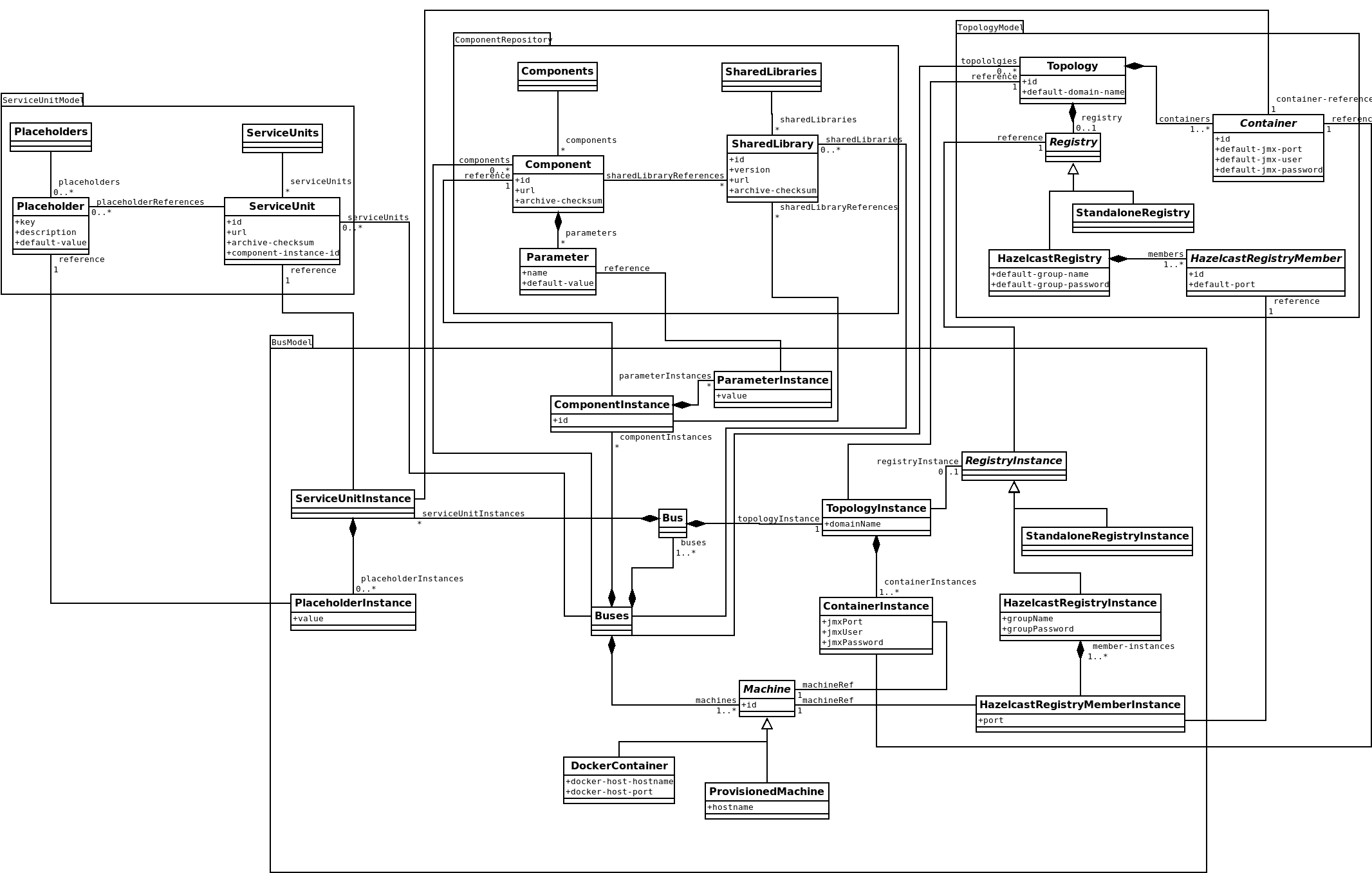
Service-units Object Model
This model defines the set of service units to deploy on your Petals ESB bus. This model will be mainly written by development teams because they have the knowledge of service units to deploy.
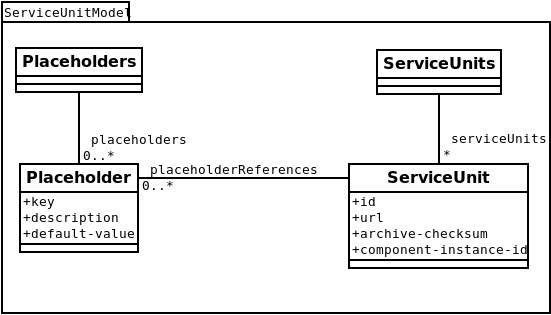
This model is composed of following elements:
- service-units, the list of service units that must be deployed,
- service-unit, one service unit to deploy:
- id, the identifier of this service-unit in the model. Can be different from the service unit name,
- url, the URL of the associated archive that can be a service assembly or a deployable service unit.
- placeholders, the set of placeholders that the service unit requires for its execution,
- placeholder, a placeholder required by a service-unit:
- key, the place holder name as used in the service-unit. A value is associated to this placeholder in the bus object model.
Topology Object Model
This model defines the topology of your Petals ESB bus. This model will be mainly written by the Petals ESB bus architect.
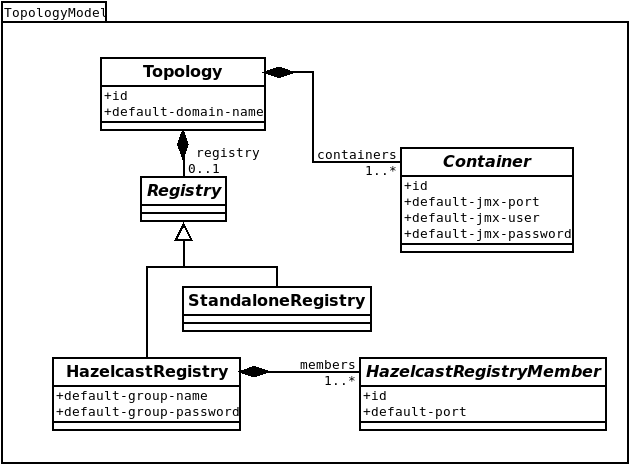
This model is composed of following elements:
- topology, the topology definition of your Petals ESB bus, with:
- containers, its different Petals ESB containers as a list of container,
- registry, the registry used in your topology. Optional.
- container, a Petals ESB container member of your topology:
- id, identifier of the Petals ESB container as used as name in the file topology.xml,
- standalone-registry, the registry is implemented by Petals ESB Standalone Registry, default implementation for a standalone topology. Can not be used for a distributed topology,
- hazelcast-registry, the registry is implemented by Petals ESB Hazelcast Registry, default implementation for a distributed topology:
- members, the members of the Petals ESB Hazelcast Registry,
- hazelcast-registry-member, a member of the Petals ESB Hazelcast Registry:
- id, identifier of the Petals ESB Hazelcast Registry member as used as name in the file cluster.xml,
Bus Object Model
This model defines your Petals ESB bus. This model will be mainly written by the Petals ESB bus architect in agreement with operators.
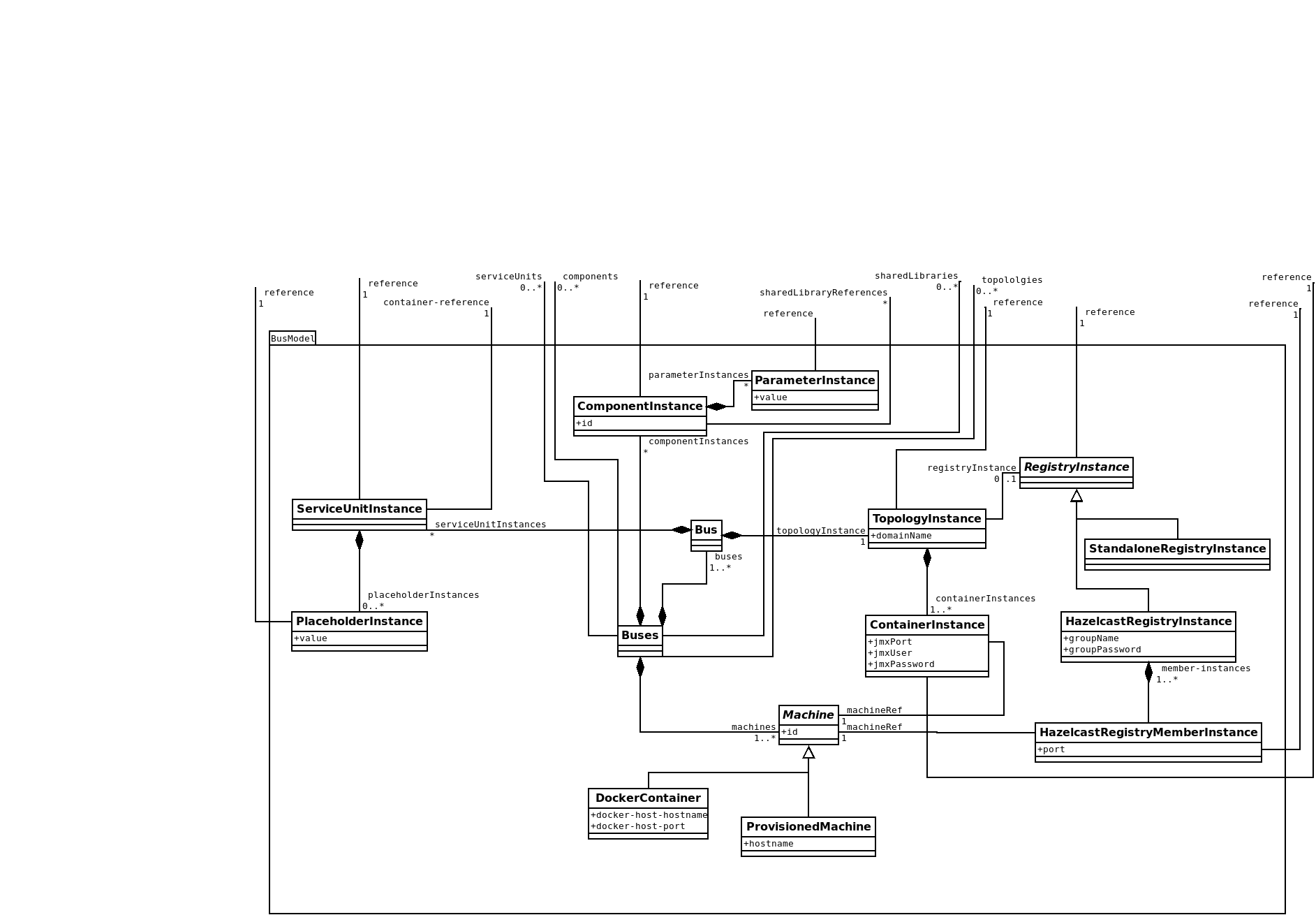
This model is composed of following elements:
- Bus, the Petals ESB bus to deploy, with:
- service-units, the service units to deploy,
- registry-instance, the instance of the registry to used in the topology,
- container-instances, the instances of Petals ESB containers forming the Petals ESB bus,
- machines, a list of machine on which the current Petals ESB bus is running,
- machine, a machine on which a part of the Petals ESB bus is running:
- id, identifier of the machine used as reference key for container-instance and {{hazelcast-registry-member-instance},
- several types of machines are supported:
- provisioned-machine, a provisioned machine as a physical machine or a virtual machine already existing:
- hostname, hostname or IP address of the current provisioned machine,
- docker-container, a Docker container running a Petals ESB component:
- docker-host-hostname, hostname of the Docker host on which the Docker container will be started,
- docker-host-port, port of the Docker daemon of the Docker host on which the Docker container will be started,
- provisioned-machine, a provisioned machine as a physical machine or a virtual machine already existing:
- container-instance, the instance of a Petals ESB container defined in the topology model:
- reference, reference to a container of the topology object model,
- host-machine, the reference of the machine on which the current Petals ESB Container is running,
- jmxPort, port JMX of the current Petals ESB container,
- jmxUser, JMX username of the current Petals ESB container,
- jmxPassword, JMX password of the current Petals ESB container,
- service-unit-instance, an instance of a service unit running on a Petals ESB container:
- reference, reference to a service-unit of the service-units object model,
- container-reference, reference to a container of the topology object model,
- placeholders, the set of placeholder-instance that must be applied to the current service-unit instance to set the right placeholder values,
- placeholder-instance, an instance of placeholder to define its value:
- reference, reference to a placeholder of the service-units object model,
- value, value to set to the current placeholder,
- hazelcast-registry-instance defines the registry instance of the current Petals ESB bus as a Petals ESB Hazelcast Registry instance:
- reference, the reference of the Petals ESB Hazelcast Registry in the topology object model,
- group-name, name identifying the Petals ESB Hazelcast Registry instance inside the Hazelcast cluster,
- group-password, password of the Petals ESB Hazelcast Registry instance,
- member-instances, list of member instances (hazelcast-registry-member-instance) composing the current Petals ESB Hazelcast Registry instance,
- hazelcast-registry-member-instance, a member of the current Petals ESB Hazelcast Registry instance:
- reference, the reference of the member of the Petals ESB Hazelcast Registry in the topology object model,
- host-machine, the reference of the machine on which the current Petals ESB Hazelcast Registry is running,
- port, the communication port of the current member instance.
Writing your deployment model
The best practice is to write your deployment model with different files:
- a 1st file for your service units object model, written by your development team,
- a 2nd file for your topology object model, written by the Petals ESB architect,
- and a 3rd file for your bus object model, written by the Petals ESB bus architect in agreement with operators.
But you are able to write your deployment model in only one file.
All models are written in a JSON format.
Writing a service units object model
Example of a service unit object model:
<service-units xmlns="http://petals.ow2.org/deployer/models/service-units.om/1.0" targetNamespace="http://petals.ow2.org/deployer/sample.suom">
  <service-unit id="su-filetransfer-consume">
    <url>mvn://org.ow2.petals.samples.filetransfer/su-filetransfer-consume/4.1.0-1.0.0</url>
  </service-unit>
  <service-unit id="su-filetransfer-provide">
    <url>mvn://org.ow2.petals.samples.filetransfer/su-filetransfer-provide/4.1.0-1.0.0</url>
  </service-unit>
</service-units>
Writing a topology object model
Example of a standalone topology object model:
<topology xmlns="http://petals.ow2.org/deployer/models/topology.om/1.0" targetNamespace="http://petals.ow2.org/deployer/sample-standalone.tom">
  <containers>
    <container id="cont-0" />
  </containers>
</topology>
Example of a distributed topology object model:
<topology xmlns="http://petals.ow2.org/deployer/models/topology.om/1.0" targetNamespace="http://petals.ow2.org/deployer/sample-distributed.tom">
  <containers>
    <container id="cont-0" />
    <container id="cont-1" />
  </containers>
  <hazelcast-registry>
    <members>
      <member id="hzlreg-0" />
    </members>
  </hazelcast-registry>
</topology>
Writing a bus object model
Example of a bus based on a standalone topology:
<bus
  xmlns="http://petals.ow2.org/deployer/models/bus.om/1.0"
  xmlns:suom="http://petals.ow2.org/deployer/sample.suom"
  xmlns:tom="http://petals.ow2.org/deployer/sample-standalone.tom"
  targetNamespace="http://petals.ow2.org/deployer/sample-standalone.bom">

  <!-- Import of the service unit object model -->
  <import namespace="http://petals.ow2.org/deployer/sample.suom" location="sample.suom"
      importType="http://petals.ow2.org/deployer/models/service-units.om/1.0">
  <!-- Import of the topology object model -->
  <import namespace="http://petals.ow2.org/deployer/sample-standalone.tom" location="sample-standalone.tom"
      importType="http://petals.ow2.org/deployer/models/topology.om/1.0">

  <machines>
    <provisioned-machine id="machine-00">
      <hostname>machine-00.petals.org</hostname>
    </provisioned-machine>
  </machines>

  <container-instances>
    <container-instance ref="tom:cont-0" machine-ref="machine-00" jmx-port="7700" jmx-user="petals" jmx-password="petals"/>
  </container-instances>

  <service-unit-instances>
    <service-unit-instance ref="suom:su-filetransfer-consume" container-ref="tom:cont-0" />
    <service-unit-instance ref="suom:su-filetransfer-provide" container-ref="tom:cont-0" />
  </service-unit>
</topology>
Example of a bus based on a distributed topology:
<bus
  xmlns="http://petals.ow2.org/deployer/models/bus.om/1.0"
  xmlns:suom="http://petals.ow2.org/deployer/sample.suom"
  xmlns:tom="http://petals.ow2.org/deployer/sample-distributed.tom"
  targetNamespace="http://petals.ow2.org/deployer/sample-standalone.bom">

  <!-- Import of the service unit object model -->
  <import namespace="http://petals.ow2.org/deployer/sample.suom" location="sample.suom"
      importType="http://petals.ow2.org/deployer/models/service-units.om/1.0">
  <!-- Import of the topology object model -->
  <import namespace="http://petals.ow2.org/deployer/sample-distributed.tom" location="sample-distributed.tom"
      importType="http://petals.ow2.org/deployer/models/topology.om/1.0">

  <machines>
    <provisioned-machine id="machine-00">
      <hostname>machine-00.petals.org</hostname>
    </provisioned-machine>
    <provisioned-machine id="machine-01">
      <hostname>machine-01.petals.org</hostname>
    </provisioned-machine>
    <provisioned-machine id="machine-02">
      <hostname>machine-02.petals.org</hostname>
    </provisioned-machine>
  </machines>

  <hazelcast-registry-instance group-name="default-sample" group-password="s3cr3t">
    <hazelcast-registry-member-instances>
      <hazelcast-registry-member-instance machine-ref="machine-02" port="7900" />
    </hazelcast-registry-member-instances>
  </hazelcast-registry-instance>

  <container-instances>
    <container-instance ref="tom:cont-0" machine-ref="machine-00" jmx-port="7700" jmx-user="petals" jmx-password="petals"/>
    <container-instance ref="tom:cont-1" machine-ref="machine-01" jmx-port="7700" jmx-user="petals" jmx-password="petals"/>
  </container-instances>

  <service-unit-instances>
    <!-- Service unit deployed on container 'cont-0' -->
    <service-unit-instance ref="suom:su-filetransfer-consume" container-ref="tom:cont-0" />
    <service-unit-instance ref="suom:su-filetransfer-provide" container-ref="tom:cont-0" />

    <!-- Service unit deployed on container 'cont-1' -->
    <service-unit-instance ref="suom:su-filetransfer-consume" container-ref="tom:cont-1" />
    <service-unit-instance ref="suom:su-filetransfer-provide" container-ref="tom:cont-1" />
  </service-unit>
</topology>
Petals Deployment Model
Source code
Maven project work in progress (POC ?)
Example project
Here is a project to try making deployment model for an existing project (with script CLI)