 E-mail
FeaturesThe component BC Gateway enables to create secured (encrypted and authenticated) bridges between Petals domains governed by separate entities.
From the point of view of this BC, one (or several in case of HA) container in each Petals domain will either play the role of provider domain or consumer domain:
By default the Gateway BC takes care of reconnecting in case of disconnection, polling for changes in the activated endpoints to keep the consumer domain a mirror of the provider domain and it is possible to rewrite propagated services names in the consumer domain if needed. By service, we mean one as defined in a WSDL: it is specified by an interface name and a service name.
Service Units ConfigurationIn terms of configuration (i.e., definition of Service Units), this results in two different artefacts: Consumes and Provides SUs. The particularity of the Gateway BC is that, while Consumes SUs explicitly define which are the consumed services that are going to be propagated from their domain, Provides SUs do not have to (but can) define the services that are going to be propagated to their domain: these are inferred based on the services actually propagated by the provider domain. Component Transport ListenersTechnically, the component onto which the Consumes SUs are deployed must define how to listen to incoming connections (on a host and TCP port currently) from Provides SUs.
|
Table of contents
Contributors
No contributors found for: authors on selected page(s)
|
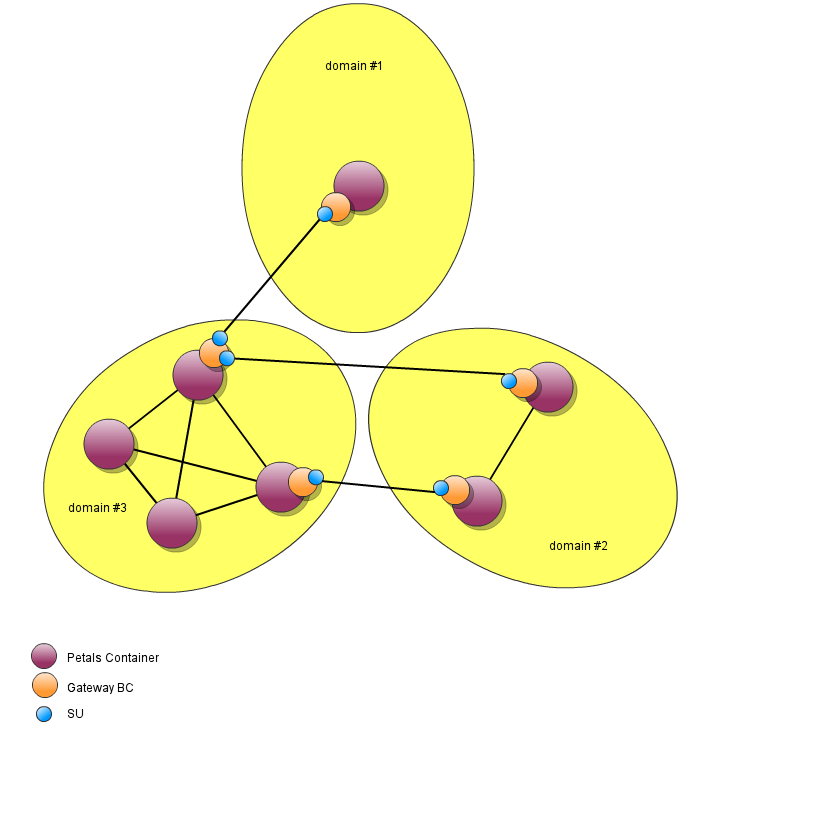
Setting up a simple domain-to-domain propagation
Let's consider two domains A and B.
The number of containers in each of the domain is not important here: we must only select for each one container onto which the Gateway BC and its SU will deployed.
The domain A will act as the provider domain and will thus declare in its SU a set of Consumes as well as information needed to identify the consumer domain.
The domain B will act as the consumer domain and will thus declare in its SU the information needed to connect to the provider domain.
Let's consider that A will propagate several services:
- One denoted only by its interface name Interface1 (hence it will matches all endpoints of that interface, potentially with different service name and of course with different endpoint names).
- One denoted by its interface name Interface2 and service name Service2 (hence it will matches all endpoints of that interface and service name).
- One denoted by its interface name Interface3, service name Service3 and endpoint name endpoint3 (hence it will match exactly one endpoint).
Provider Domain A
For the provider domain, it is necessary to both define a Consumes SU and a transport listener at the component level.
Consumes SU
The Consumes SU deployed on the Domain A is as follow:
<?xml version="1.0" encoding="UTF-8"?>
<jbi:jbi version="1.0" xmlns:xsi="http://www.w3.org/2001/XMLSchema-instance" xmlns:jbi="http://java.sun.com/xml/ns/jbi"
   xmlns:cdk="http://petals.ow2.org/components/extensions/version-5" xmlns:g="http://petals.ow2.org/components/petals-bc-gateway/version-1.0"
   xmlns:test="http://test/">

   <jbi:services binding-component="true">

      <jbi:consumes interface-name="test:Interface1">

         <!-- CDK specific elements -->
         <cdk:mep xsi:nil="true" />

         <!-- Component specific elements -->
         <g:consumer domain="domainB" />

      </jbi:consumes>

      <jbi:consumes interface-name="test:Interface2" service-name="test:Service2">

         <!-- CDK specific elements -->
         <cdk:mep xsi:nil="true" />

         <!-- Component specific elements -->
         <g:consumer domain="domainB" />

      </jbi:consumes>

      <jbi:consumes interface-name="test:Interface3" service-name="test:Service3" endpoint-name="endpoint3">

         <!-- CDK specific elements -->
         <cdk:mep xsi:nil="true" />

         <!-- Component specific elements -->
         <g:consumer domain="domainB" />

      </jbi:consumes>

      <g:consumer-domain id="domainB" transport="transport1">
         <g:auth-name>UniquelySharedBetweenA&B</g:auth-name>
      </g:consumer-domain>

   </jbi:services>
</jbi:jbi>
Here we see we chose to use the authentication name UniquelySharedBetweenA&B and the consumer domain will need to know this information.
 | The authentication name is NOT meant to introduce security in the use of the Gateway BC: for that it is necessary to use [SSL]! |
 | The elements defined inside consumer-domain in an SU accept placeholder values. |
Component's Transport Listener
As we can see the Consumes SU relies on the existence of a transport called transport1.
By default there is no pre-configured transport listener on the Gateway BC but there is multiple ways to define them statically (see [#component-configuration] below) or dynamically with Petals CLI (see Petals BC Gateway tooling).
For example, we can use the following CLI command to create the transport listener before deploying the Consumes SU:
> bc-gateway.add-transport-listener -i transport1 -p 7500
Here we can see we chose the port 7500 and the consumer domain will need to know this information.
Consumer Domain B
For the consumer domain, it is only necessary to define a Provides SU based on the previously gathered information (authentication name, port) and hostname of the provider domain BC Gateway.
The Provides SU deployed on the Domain B is as follow:
<jbi:jbi version="1.0" xmlns:xsi="http://www.w3.org/2001/XMLSchema-instance" xmlns:jbi="http://java.sun.com/xml/ns/jbi"
   xmlns:cdk="http://petals.ow2.org/components/extensions/version-5" xmlns:g="http://petals.ow2.org/components/petals-bc-gateway/version-1.0">

   <jbi:services binding-component="true">

      <g:provider-domain id="domainA">
         <g:remote-ip>domainA-hostname</g:remote-ip>
         <g:remote-port>7500</g:remote-port>
         <g:remote-auth-name>UniquelySharedBetweenA&B</g:remote-auth-name>
      </g:provider-domain>

   </jbi:services>
</jbi:jbi>
| The elements defined inside provider-domain in an SU accept placeholder values. |
Service Propagations
If we start with one container for A and one container for B without anything on them and after:
- deploying the Gateway BC on each of the container of A and B.
- adding the transport listener on the Gateway BC of A.
- deploying the Consumes SU on the Gateway BC of A and the Provides SU on the Gateway BC of B.
| The order of deployment is not very important as by default, the Provides SU will try to reconnect until it succeeds |
.
We can see that no endpoints have been deployed on B: this is expected because A will only propagate existing endpoints.
Using SSL to authenticate and encrypt exchanges between domains
Provider Domain A
Consumer Domain B
Service Rewriting
Service Unit Configuration
Consumer Domain
Provider Domain
Consumes
Provides
Component Configuration
The component configuration includes the configuration of the CDK. The following parameters correspond to the CDK configuration.
| Parameter | Description | Default | Scope |
|---|---|---|---|
| acceptor-pool-size | The size of the thread pool used to accept Message Exchanges from the NMR. Once a message is accepted, its processing is delegated to the processor pool thread. | 1 |
Runtime |
| acceptor-retry-number | Number of tries to submit a message exchange to a processor for processing before to declare that it cannot be processed. | 40 |
Installation |
| acceptor-retry-wait | Base duration, in milliseconds, to wait between two processing submission tries. At each try, the new duration is the previous one plus this base duration. | 250 |
Installation |
| acceptor-stop-max-wait | The max duration (in milliseconds) before, on component stop, each acceptor is stopped by force. | 500 |
Runtime |
| processor-pool-size | The size of the thread pool used to process Message Exchanges. Once a message is accepted, its processing is delegated to one of the thread of this pool. | 10 | Runtime |
| processor-max-pool-size | The maximum size of the thread pool used to process Message Exchanges. The difference between this size and the processor-pool-size represents the dynamic threads that can be created and destroyed during overhead processing time. |
50 |
Runtime |
| processor-keep-alive-time | When the number of processors is greater than the core, this is the maximum time that excess idle processors will wait for new tasks before terminating, in seconds. |
300 |
Runtime |
| processor-stop-max-wait | The max duration (in milliseconds) of message exchange processing on stop phase (for all processors). |
15000 |
Runtime |
| time-beetween-async-cleaner-runs | The time (in milliseconds) between two runs of the asynchronous message exchange cleaner. |
2000 |
Installation |
| properties-file | Name of the file containing properties used as reference by other parameters. Parameters reference the property name using a placeholder in the following pattern ${myPropertyName}. At runtime, the expression is replaced by the value of the property. The properties file can be reloaded using the JMX API of the component. The runtime configuration MBean provides an operation to reload these place holders. Check the service unit parameters that support this reloading. The value of this parameter is :
|
- | Installation |
| monitoring-sampling-period | Period, in seconds, of a sample used by response time probes of the monitoring feature. |
300 |
Installation |
| Parameter | Description | Default | Required | Scope |
|---|---|---|---|---|
| consumer-domains-max-pool-size | Max number of threads used for handling incoming consumer partner connections: while each incoming consumer partner connection handles one exchange at a time, this limits the number of concurrent exchange processing amongst all incoming connection | 6
|
No
|
Installation
|
| provider-domains-max-pool-size | Max number of threads used for handling outgoing provider partner connections: while each outgoing provider partner connection handles one exchange at a time, this limits the number of concurrent exchange processing amongst all outgoing connection | 6
|
No
|
Installation
|
Definition of CDK parameter scope :
- Installation: The parameter can be set during the installation of the component, by using the installation MBean (see JBI specifications for details about the installation sequence). If the parameter is optional and has not been defined during the development of the component, it is not available at installation time.
- Runtime: The paramater can be set during the installation of the component and during runtime. The runtime configuration can be changed using the CDK custom MBean named RuntimeConfiguration. If the parameter is optional and has not been defined during the development of the component, it is not available at installation and runtime times.
Logging
The traces of Apache Netty itself can be activated through the logging configuration file of Petals ESB. The root logger for Netty is io.netty:
...
io.netty.level=INFO
...
Monitoring the component
Using metrics
Several probes providing metrics are included in the component, and are available through the JMX MBean 'org.ow2.petals:type=custom,name=monitoring_<component-id>', where <component-id> is the unique JBI identifier of the component.
Common metrics
The following metrics are provided through the Petals CDK, and are common to all components:
| Metrics, as MBean attribute | Description | Detail of the value | Configurable |
|---|---|---|---|
| MessageExchangeAcceptorThreadPoolMaxSize | The maximum number of threads of the message exchange acceptor thread pool | integer value, since the last startup of the component | yes, through acceptor-pool-size |
| MessageExchangeAcceptorThreadPoolCurrentSize | The current number of threads of the message exchange acceptor thread pool. Should be always equals to MessageExchangeAcceptorThreadPoolMaxSize. | instant integer value | no |
| MessageExchangeAcceptorCurrentWorking | The current number of working message exchange acceptors. | instant long value | no |
| MessageExchangeAcceptorMaxWorking | The max number of working message exchange acceptors. | long value, since the last startup of the component | no |
| MessageExchangeAcceptorAbsoluteDurations | The aggregated durations of the working message exchange acceptors since the last startup of the component. | n-tuple value containing, in nanosecond:
|
no |
| MessageExchangeAcceptorRelativeDurations | The aggregated durations of the working message exchange acceptors on the last sample. | n-tuple value containing, in nanosecond:
|
no |
| MessageExchangeProcessorAbsoluteDurations | The aggregated durations of the working message exchange processor since the last startup of the component. | n-tuple value containing, in milliseconds:
|
no |
| MessageExchangeProcessorRelativeDurations | The aggregated durations of the working message exchange processor on the last sample. | n-tuple value containing, in milliseconds:
|
no |
| MessageExchangeProcessorThreadPoolActiveThreadsCurrent | The current number of active threads of the message exchange processor thread pool | instant integer value | no |
| MessageExchangeProcessorThreadPoolActiveThreadsMax | The maximum number of threads of the message exchange processor thread pool that was active | integer value, since the last startup of the component | no |
| MessageExchangeProcessorThreadPoolIdleThreadsCurrent | The current number of idle threads of the message exchange processor thread pool | instant integer value | no |
| MessageExchangeProcessorThreadPoolIdleThreadsMax | The maximum number of threads of the message exchange processor thread pool that was idle | integer value, since the last startup of the component | no |
| MessageExchangeProcessorThreadPoolMaxSize | The maximum size, in threads, of the message exchange processor thread pool | instant integer value | yes, through http-thread-pool-size-max |
| MessageExchangeProcessorThreadPoolMinSize | The minimum size, in threads, of the message exchange processor thread pool | instant integer value | yes, through http-thread-pool-size-min |
| MessageExchangeProcessorThreadPoolQueuedRequestsCurrent | The current number of enqueued requests waiting to be processed by the message exchange processor thread pool | instant integer value | no |
| MessageExchangeProcessorThreadPoolQueuedRequestsMax | The maximum number of enqueued requests waiting to be processed by the message exchange processor thread pool since the last startup of the component | instant integer value | no |
| ServiceProviderInvocations | The number of service provider invocations grouped by:
|
integer counter value since the last startup of the component | no |
| ServiceProviderInvocationsResponseTimeAbs | The aggregated response times of the service provider invocations since the last startup of the component grouped by:
|
n-tuple value containing, in millisecond:
|
no |
| ServiceProviderInvocationsResponseTimeRel | The aggregated response times of the service provider invocations on the last sample, grouped by:
|
n-tuple value containing, in millisecond:
|
no |
Dedicated metrics
No dedicated metric is available.
Receiving alerts
Several alerts are notified by the component through notification of the JMX MBean 'org.ow2.petals:type=custom,name=monitoring_<component-id>', where <component-id> is the unique JBI identifier of the component.
| To integrate these alerts with Nagios, see Receiving Petals ESB defects in Nagios. |
Common alerts
| Defect | JMX Notification |
|---|---|
| A message exchange acceptor thread is dead |
|
| No more thread is available in the message exchange acceptor thread pool |
|
| No more thread is available to run a message exchange processor |
|
Dedicated alerts
No dedicated alert is available.