What is the BC-Mail ?
The Petals Mail binding component is a bidirectional binding component, it allows to :
- retrieve mails from an email account and send them to a JBI Service
- send JBI messages to an email account
Component Configuration
Unable to render {include} Couldn't find a page to include called: 0 CDK Component Configuration Table
Definition of CDK parameter scope :
- Installation: The parameter can be set during the installation of the component, by using the installation MBean (see JBI specifications for details about the installation sequence). If the parameter is optional and has not been defined during the development of the component, it is not available at installation time.
- Runtime: The paramater can be set during the installation of the component and during runtime. The runtime configuration can be changed using the CDK custom MBean named RuntimeConfiguration. If the parameter is optional and has not been defined during the development of the component, it is not available at installation and runtime times.
Service Configuration
PROVIDE SERVICE : Import into the JBI environment an email account as a service, or use a generic SendMail service :
Petals Mail binding component allows JBI consumers to send mails to an email account. A JBI endpoint is registered into the JBI environment, and is linked to an smtp server, with an email address defined. When MailBC receives a message exchange from Petals platform, the content of the message is sent to the defined email address.
The component can also provide a generic SendMail service. This service allows the consumer to send a specific XML message to the component, which defines all the information needed to send an email. To use this generic service, the consumer has to call explicitely the {service namespace}send operation.
The message send by the consumer has to respect the following definition :
<ns0:mail xmlns:ns0="http://petals.ow2.org/components/mail/version-3.0">
    <ns0:from>from@from.com</ns0:from>
    <ns0:reply>reply@reply.com</ns0:reply>
    <ns0:to>to@to.com</ns0:to>
    <ns0:subject>subject</ns0:subject>
    <ns0:body>Hello, here is an email</ns0:body>
</ns0:mail>
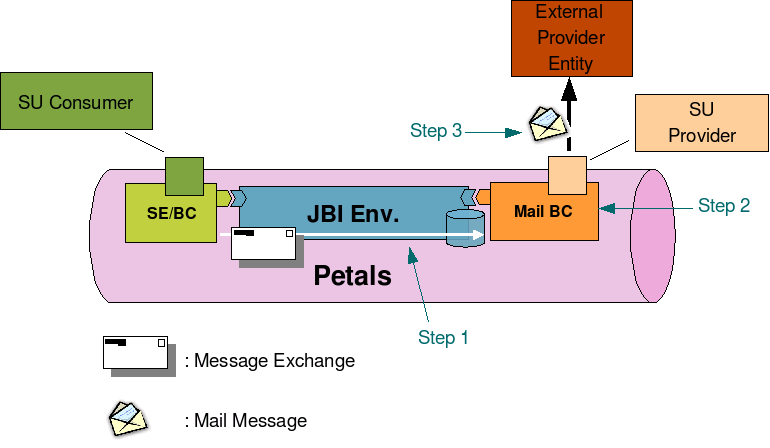
Sending mails
- Step 1 : A JBI Consumer sends a Message Exchange to the Mail Binding Component.
- Step 2 : Mail Binding Component processes the Message Exchange : transforms it into a mail message and retrieve targeted External Provider Service (email address) linked to the endpoint set in the Message Exchange.
- Step 3 : Mail Binding Component sends this new mail to the targeted External Provider Service (Business Service, simple email account...).
Send mails
todo
Service Unit descriptor
todo
Service Unit content
todo
Usage
todo
Receive mails
todo
Service Unit descriptor
Petals Mail binding component can be configured by deploying a new service unit to it. The jbi descriptor (jbi.xml file) of this service unit must contains a consumes node describing the link between an external mail store and an internal jbi endpoint. Here is an exemple of jbi descriptor activating a new "consumed service" :
<?xml version="1.0" encoding="UTF-8"?>
<jbi:jbi version="1.0"
xmlns:xsi="http://www.w3.org/2001/XMLSchema-instance"
xmlns:jbi="http://java.sun.com/xml/ns/jbi"
xmlns:mail="http://petals.ow2.org/components/mail/version-3.0"
xmlns:petalsCDK="http://petals.ow2.org/components/extensions/version-4.0"
xmlns:generatedNs="http://test">
use a BC. -->
<jbi:services binding-component="true">
consumes a Service. -->
<jbi:consumes
interface-name="generatedNs:Interface"
service-name="generatedNs:Service"
endpoint-name="Endpoint">
<petalsCDK:operation>operation</petalsCDK:operation>
<petalsCDK:mep>InOnly</petalsCDK:mep>
<mail:scheme>pop3</mail:scheme>
<mail:host>pop.host.com</mail:host>
<mail:port>110</mail:port>
<mail:user>user</mail:user>
<mail:password>password</mail:password>
<mail:folder>INBOX</mail:folder>
<mail:period>60000</mail:period>
</jbi:consumes>
</jbi:services>
</jbi:jbi>
Configuration of a Service Unit to consume a service (JBI)
| Parameter |
Description |
Default |
Required |
| consumes |
Refer JBI service to invoke into the JBI bus.
You can define an explicit endpoint: interface (QName) / Service (QName) / Endpoint (String) attributes.
Or define implicit endpoint, to let the container routing according to QOS configurations (HA...):
-by Interface attribute (QName)
-by Service attribute (QName) |
- |
Yes |
Configuration of a Service Unit to consume a service (CDK)
| Parameter |
Description |
Default |
Required |
| mep |
Message exchange pattern abbreviation. This parameter can be used in conjunction with the method of the CDK Listeners: createMessageExchange(Extensions extensions).
This method returns a CDK Exchange corresponding to the type of the specified pattern. |
- |
Yes |
| operation |
Operation to call on a service. This parameter can be used in conjunction with the sending methods of the Listeners. If no operation is specified in the Message Exchange to send, this parameter will be used. |
- |
No |
| timeout |
Timeout in milliseconds of a synchronous send. This parameter can be used in conjunction with the sendSync(Exchange exchange) method of the Listeners. Set 0 for an infinite timeout. |
30000 |
No |
| Parameter |
Description |
Default |
Required |
| scheme |
the connection protocol (imap or pop3) |
- |
Yes |
| username |
the username used for authentication |
- |
No |
| password |
the password used for authentication. Can be null or empty |
- |
No |
| host |
the host used for connection |
- |
Yes |
| port |
the port used for connection |
|
No |
| folder |
the folder to check for new mails |
INBOX |
No |
| period |
the checking period time |
60 000 ms |
No |
| expunge |
Expunge deleted messages (read messages are marked as DELETED, default is TRUE) |
true |
No |
Configuration of a Service Unit to consume a service (Mail)Service Unit content
The Service Unit has to contain the following elements, packaged in an archive :
- The META-INF/jbi.xml descriptor file, has described above
Usage
When a new email is in the INBOX folder of the configured email account, the content of the mail is forwarded to the JBI Service defined in the Consumes section of the Service Unit.
 | The component sends exchange with the InOnly pattern only. |
|
 E-mail