 E-mail
IntroductionThe Petals BC Soap is composed of several internal components. Each one can be monitored and provides several metrics:
Moreover, as the Petals BC Soap is based on the Petals CDK, all common metrics are also provided, see Monitoring Petals CDK-based components. |
Table of contents Contributors
No contributors found for: authors on selected page(s)
|
Monitoring the consumer side
Monitoring the thread pool processing incoming requests
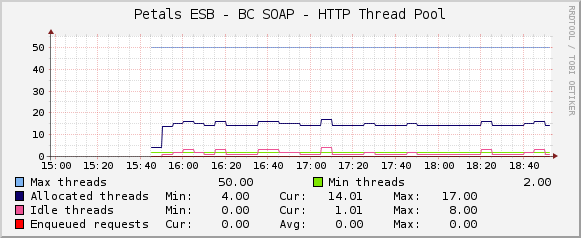
See Creating a graph using a simple data to graph the stats of the thread pool processing incoming requests:
- Script/Command of the data input method: petals-cli.sh -h <petals_host> -n <petals_jmx_port> -u <petals_jmx_user> -p <petals_jmx_password> -c -- monitoring -o petals-bc-soap -f http-thread-pool -- -n <petals-bc-soap-id>

If you have only one Petals BC SOAP installed on your Petals node, the input field petals-bc-soap-id can be replaced by its value - Output fields of the script/command:
Name Description Type AllocatedThreadsMax The maximum number of allocated threads GAUGE AllocatedThreadsCurrent The current number of allocated threads GAUGE IdleThreadsMax The maximum number of idle threads GAUGE IdleThreadsCurrent The current number of idle threads GAUGE MaxSize The maximum size of the thread pool GAUGE MinSize The minimum size of the thread pool GAUGE EnqueuedRequestsMax The maximum number of requests that are enqueued waiting a thread to be processed GAUGE EnqueuedRequestsCurrent The current number of requests that are enqueued waiting a thread to be processed GAUGE
Monitoring the incoming requests
Unable to render embedded object: File (petals-local-transporter-delivered-messages.png) not found.
See Creating a graph using a simple data to graph the incoming requests:
- Script/Command of the data input method: petals-cli.sh -h <petals_host> -n <petals_jmx_port> -u <petals_jmx_user> -p <petals_jmx_password> -c -- monitoring -o petals-bc-soap -f incoming-http-requests-count -- -n <petals-bc-soap-id> -r
If you have only one Petals BC SOAP installed on your Petals node, the input field petals-bc-soap-id can be replaced by its value - Output fields of the script/command:
Name Description Type Information Number of information request received COUNTER Unknown Number of unknown request received COUNTER WS Number of web-service request received COUNTER
Monitoring the web-service requests per operation and execution status
Unable to render embedded object: File (incoming-ws-requests-count.png) not found.
See Creating a graph using a data query to graph the stats about web-service requests per operation:
- the data query definition to put in a file:
<interface>
        <name>Get web-service request number of the BC Soap per operation</name>
        <script_path>petals-cli.sh</script_path>
        <arg_prepend>-h localhost -n 7700 -u petals -p petals -c -- monitoring -o petals-bc-soap -f incoming-ws-requests-count</arg_prepend>
        <arg_index>-- -n petals-bc-soap --list-operations</arg_index>
        <arg_query>-- -n petals-bc-soap --query-operations</arg_query>
        <arg_get>-- -n petals-bc-soap --query-operations</arg_get>
        <output_delimeter>!</output_delimeter>
        <index_order>filterName</index_order>
        <index_order_type>alphanumeric</index_order_type>
        <!--index_title_format>|chosen_order_field|</index_title_format-->

        <fields>
                <filterName>
                        <name>Operation name</name>
                        <direction>input</direction>
                        <query_name>NAME</query_name>
                </filterName>
                <succeeded>
                        <name>Succeeded invokation counter</name>
                        <direction>output</direction>
                        <query_name>SUCCEEDED</query_name>
                </succeeded>
                <error>
                        <name>Failed invokation counter</name>
                        <direction>output</direction>
                        <query_name>ERROR</query_name>
                </error>
                <fault>
                        <name>Faulty invokation counter</name>
                        <direction>output</direction>
                        <query_name>FAULT</query_name>
                </fault>
                <pending>
                        <name>Pending invokation counter</name>
                        <direction>output</direction>
                        <query_name>PENDING</query_name>
                </pending>
        </fields>
</interface>
- Output fields of the script/command:
Name Description Type succeeded The succeeded invokation counter COUNTER error The failed invokation counter COUNTER fault The faulty invokation counter COUNTER pending The pending invokation counter GAUGE