 E-mail
IntroductionAll components based on the Petals Component Development Kit provide following metrics:
|
Table of contents
Contributors
No contributors found for: authors on selected page(s)
|
Monitoring the provider side
Monitoring the message exchange acceptor thread pool
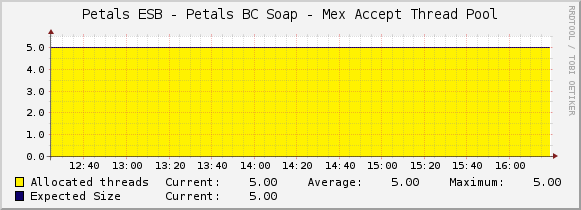
See Creating a graph using a simple data to graph the stats of the thread pool accepting message exchanges:
- Script/Command of the data input method: petals-cli.sh -h <petals_host> -n <petals_jmx_port> -u <petals_jmx_user> -p <petals_jmx_password> -c -- monitoring -o generic -f mex-acceptor-thread-pool -- -n <component-id>
- Output fields of the script/command:
Name Description Type AllocatedThreadsMax The maximum number of allocated threads GAUGE AllocatedThreadsCurrent The current number of allocated threads GAUGE
Monitoring the message exchange processor object pool
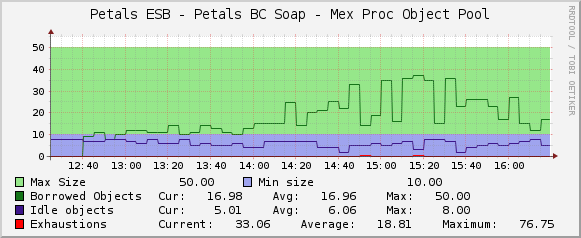
See Creating a graph using a simple data to graph the stats of the object pool of message exchanges:
- Script/Command of the data input method: petals-cli.sh -h <petals_host> -n <petals_jmx_port> -u <petals_jmx_user> -p <petals_jmx_password> -c -- monitoring -o generic -f mex-processor-object-pool -- -n <component-id>
- Output fields of the script/command:
Name Description Type BorrowedObjectsMax The maximum number of borrowed objects GAUGE BorrowedObjectsCurrent The current number of borrowed objects GAUGE IdleObjectsMax The maximum number of idle objects GAUGE IdleObjectsCurrent The current number of idle objects GAUGE MaxSize The maximum size of the object pool GAUGE MinIdleSize The minimum size of the object pool GAUGE Exhaustions The number of exhaustions of the object pool COUNTER
Monitoring the message exchange processor thread pool
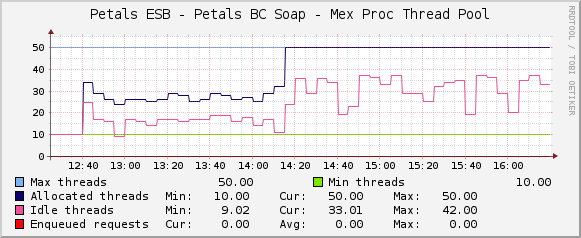
See Creating a graph using a simple data to graph the stats of the thread pool of message exchanges:
- Script/Command of the data input method: petals-cli.sh -h <petals_host> -n <petals_jmx_port> -u <petals_jmx_user> -p <petals_jmx_password> -c -- monitoring -o generic -f mex-processor-thread-pool -- -n <component-id>
- Output fields of the script/command:
Name Description Type AllocatedThreadsMax The maximum number of allocated threads GAUGE AllocatedThreadsCurrent The current number of allocated threads GAUGE IdleThreadsMax The maximum number of idle threads GAUGE IdleThreadsCurrent The current number of idle threads GAUGE MaxSize The maximum size of the thread pool GAUGE MinSize The minimum size of the thread pool GAUGE EnqueuedRequestsMax The maximum number of requests that are enqueued waiting a thread to be processed GAUGE EnqueuedRequestsCurrent The current number of requests that are enqueued waiting a thread to be processed GAUGE
Monitoring the service provider invokation number per operation and execution status
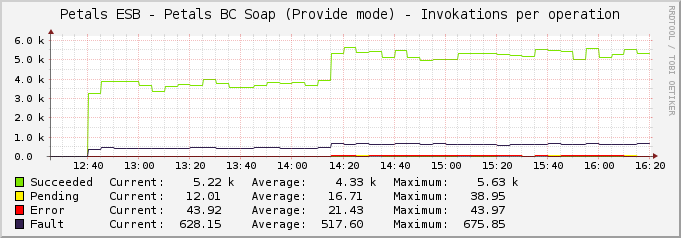
See Creating a graph using a data query to graph the stats about invokation number of a service provider:
- the data query definition to put in a file:
<interface>
        <name>Get service provider invokation number of the BC Soap per operation</name>
        <script_path>petals-cli.sh</script_path>
        <arg_prepend>-h localhost -n 7700 -u petals -p petals -c -- monitoring -o generic -f service-provider-invokations-count</arg_prepend>
        <arg_index>-- -n petals-bc-soap --list-operations</arg_index>
        <arg_query>-- -n petals-bc-soap --query-operations</arg_query>
        <arg_get>-- -n petals-bc-soap --query-operations</arg_get>
        <output_delimeter>!</output_delimeter>
        <index_order>filterName</index_order>
        <index_order_type>alphanumeric</index_order_type>
        <!--index_title_format>|chosen_order_field|</index_title_format-->

        <fields>
                <filterName>
                        <name>Operation name</name>
                        <direction>input</direction>
                        <query_name>NAME</query_name>
                </filterName>
                <succeeded>
                        <name>Succeeded invokation counter</name>
                        <direction>output</direction>
                        <query_name>SUCCEEDED</query_name>
                </succeeded>
                <error>
                        <name>Failed invokation counter</name>
                        <direction>output</direction>
                        <query_name>ERROR</query_name>
                </error>
                <fault>
                        <name>Faulty invokation counter</name>
                        <direction>output</direction>
                        <query_name>FAULT</query_name>
                </fault>
                <pending>
                        <name>Pending invokation counter</name>
                        <direction>output</direction>
                        <query_name>PENDING</query_name>
                </pending>
        </fields>
</interface>
- Output fields of the script/command:
Name Description Type succeeded The succeeded invokation counter COUNTER error The failed invokation counter COUNTER fault The faulty invokation counter COUNTER pending The pending invokation counter GAUGE
Monitoring the service provider invokation response times per operation and execution status
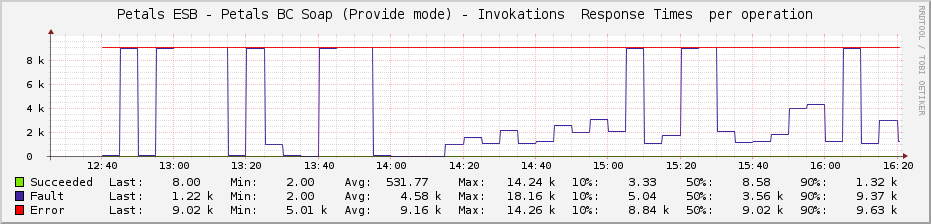
See Creating a graph using a data query to graph the stats about invokation response times of a service provider:
- the data query definition to put in a file:
<interface>
        <name>Get service provider invokation response times of the BC Soap per operation</name>
        <script_path>petals-cli.sh</script_path>
        <arg_prepend>-h localhost -n 7700 -u petals -p petals -c -- monitoring -o generic -f service-provider-invokations-response-times</arg_prepend>
        <arg_index>-- -n petals-bc-soap --list-operations</arg_index>
        <arg_query>-- -n petals-bc-soap --query-operations</arg_query>
        <arg_get>-- -n petals-bc-soap --query-operations</arg_get>
        <output_delimeter>!</output_delimeter>
        <index_order>filterName</index_order>
        <index_order_type>alphanumeric</index_order_type>
        <!--index_title_format>|chosen_order_field|</index_title_format-->

        <fields>
                <filterName>
                        <name>Operation name</name>
                        <direction>input</direction>
                        <query_name>NAME</query_name>
                </filterName>
                <succeededMin>
                        <name>Succeeded invokation: Min response time</name>
                        <direction>output</direction>
                        <query_name>SUCCEEDED_MIN</query_name>
                </succeededMin>
                <succeededAvg>
                        <name>Succeeded invokation: Avg response time</name>
                        <direction>output</direction>
                        <query_name>SUCCEEDED_AVG</query_name>
                </succeededAvg>
                <succeededMax>
                        <name>Succeeded invokation: Max response time</name>
                        <direction>output</direction>
                        <query_name>SUCCEEDED_MAX</query_name>
                </succeededMax>
                <succeeded10p>
                        <name>Succeeded invokation: 10-percentil response time</name>
                        <direction>output</direction>
                        <query_name>SUCCEEDED_10P</query_name>
                </succeeded10p>
                <succeeded50p>
                        <name>Succeeded invokation: 50-percentil response time</name>
                        <direction>output</direction>
                        <query_name>SUCCEEDED_50P</query_name>
                </succeeded50p>
                <succeeded90p>
                        <name>Succeeded invokation: 90-percentil response time</name>
                        <direction>output</direction>
                        <query_name>SUCCEEDED_90P</query_name>
                </succeeded90p>
                <pendingMin>
                        <name>Pending invokation: Min response time</name>
                        <direction>output</direction>
                        <query_name>PENDING_MIN</query_name>
                </pendingMin>
                ...
                <errorMin>
                        <name>Failed invokation: Min response time</name>
                        <direction>output</direction>
                        <query_name>ERROR_MIN</query_name>
                </errorMin>
                ...
                <faultMin>
                        <name>Faulty invokation: Min response time</name>
                        <direction>output</direction>
                        <query_name>FAULT_MIN</query_name>
                </faultMin>
        </fields>
</interface>
- Output fields of the script/command:
Name Description Type succeededMin The min response time of succeeded invokations GAUGE succeededAvg The average response time of succeeded invokations GAUGE succeededMax The max response time of succeeded invokations GAUGE succeeded10p The 10-percentil response time of succeeded invokations GAUGE succeeded50p The 50-percentil response time of succeeded invokations GAUGE succeeded90p The 90-percentil response time of succeeded invokations GAUGE
| pendingMin | The min response time of pending invokations | GAUGE |
| pendingAvg | The average response time of pending invokations | GAUGE |
| pendingMax | The max response time of pending invokations | GAUGE |
| pending10p | The 10-percentil response time of pending invokations | GAUGE |
| pending50p | The 50-percentil response time of pending invokations | GAUGE |
| pending90p | The 90-percentil response time of pending invokations | GAUGE |
| errorMin | The min response time of failed invokations | GAUGE |
| errorAvg | The average response time of failed invokations | GAUGE |
| errorMax | The max response time of failed invokations | GAUGE |
| error10p | The 10-percentil response time of failed invokations | GAUGE |
| error50p | The 50-percentil response time of failed invokations | GAUGE |
| error90p | The 90-percentil response time of failed invokations | GAUGE |
| faultMin | The min response time of faulty invokations | GAUGE |
| faultAvg | The average response time of faulty invokations | GAUGE |
| faultMax | The max response time of faulty invokations | GAUGE |
| fault10p | The 10-percentil response time of faulty invokations | GAUGE |
| fault50p | The 50-percentil response time of faulty invokations | GAUGE |
| fault90p | The 90-percentil response time of faulty invokations | GAUGE |