 E-mail
Monitoring the provider side
Monitoring the message exchange acceptor thread pool
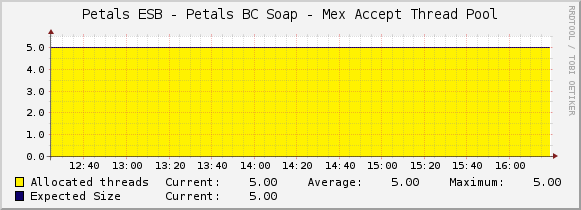
See Creating a graph using a simple data to graph the stats of the thread pool accepting message exchanges:
- Script/Command of the data input method: petals-cli.sh -h <petals_host> -n <petals_jmx_port> -u <petals_jmx_user> -p <petals_jmx_password> -c -- monitoring -o generic -f mex-acceptor-thread-pool -- -n <component-id>
- Output fields of the script/command:
Name Description Type AllocatedThreadsMax The maximum number of allocated threads GAUGE AllocatedThreadsCurrent The current number of allocated threads GAUGE
Monitoring the message exchange processor object pool
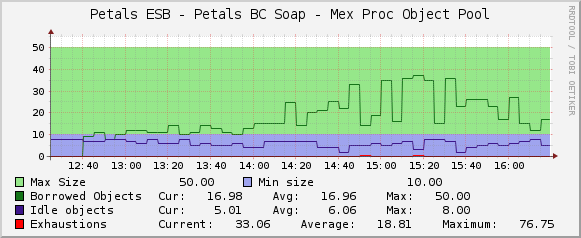
See Creating a graph using a simple data to graph the stats of the object pool of message exchanges:
- Script/Command of the data input method: petals-cli.sh -h <petals_host> -n <petals_jmx_port> -u <petals_jmx_user> -p <petals_jmx_password> -c -- monitoring -o generic -f mex-processor-object-pool -- -n <component-id>
- Output fields of the script/command:
Name Description Type BorrowedObjectsMax The maximum number of borrowed objects GAUGE BorrowedObjectsCurrent The current number of borrowed objects GAUGE IdleObjectsMax The maximum number of idle objects GAUGE IdleObjectsCurrent The current number of idle objects GAUGE MaxSize The maximum size of the object pool GAUGE MinIdleSize The minimum size of the object pool GAUGE Exhaustions The number of exhaustions of the object pool COUNTER
Monitoring the message exchange processor thread pool
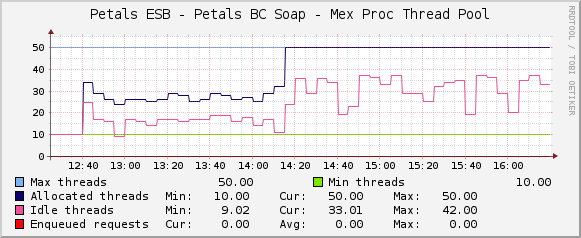
See Creating a graph using a simple data to graph the stats of the thread pool of message exchanges:
- Script/Command of the data input method: petals-cli.sh -h <petals_host> -n <petals_jmx_port> -u <petals_jmx_user> -p <petals_jmx_password> -c -- monitoring -o generic -f mex-processor-thread-pool -- -n <component-id>
- Output fields of the script/command:
Name Description Type AllocatedThreadsMax The maximum number of allocated threads GAUGE AllocatedThreadsCurrent The current number of allocated threads GAUGE IdleThreadsMax The maximum number of idle threads GAUGE IdleThreadsCurrent The current number of idle threads GAUGE MaxSize The maximum size of the thread pool GAUGE MinSize The minimum size of the thread pool GAUGE EnqueuedRequestsMax The maximum number of requests that are enqueued waiting a thread to be processed GAUGE EnqueuedRequestsCurrent The current number of requests that are enqueued waiting a thread to be processed GAUGE