 E-mail
4.1. Initialize Petals Master Database
You could initialize the Petals Master database by providing an XML dataset that conforms to the dragon-dataset.xsd XML schema included in the ${petals-master-root}/WEB-INF/classes/dataset/. Some dataset samples are available in this directory. To load a dataset two tabs are available :
The first tab "Dataset URL Import" :
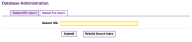
Fill the field with dataset file URL. You can load a dataset sample available in the "${petals-master-root}/WEB-INF/
classes/dataset/" directory by entering an URL like this : classpath:dataset/dataset-file-name
The second tab "Dataset File Import"
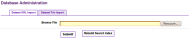
Browse your files and choose your dataset.
4.2. What does the button "Rebuild Search Index" do?
If you notice any inconsistencies in search organizations, persons or services, this may be a timing issue between the database and the search index. Click "Rebuild Search Index" which will synchronize the search index with your database.