 E-mail
Component Configuration
Before installing the bc-ejb component, you must check in your ${PETALS_HOME}/conf/server.properties configuration file if the property "petals.classloaders.isolated=true" is set and uncommented. The BC-EJB component need the isolated classloaders to work correctly.
The component can be configured through its JBI descriptor file like this :
<?xml version="1.0" encoding="UTF-8"?>
<jbi:jbi xmlns:xsi="http://www.w3.org/2001/XMLSchema-instance"
    xmlns:petalsCDK="http://petals.ow2.org/components/extensions/version-4.0"
    xmlns:jbi="http://java.sun.com/xml/ns/jbi" version="1.0">

  <jbi:component type="binding-component" component-class-loader-delegation="parent-first">

    <jbi:identification>
      <jbi:name>petals-bc-ejb</jbi:name>
      <jbi:description>an EJB Binding Component sending messages to local or distant EJB instances</jbi:description>
    </jbi:identification>

    <jbi:component-class-name>org.ow2.petals.bc.ejb.EjbBC</jbi:component-class-name>
    <jbi:component-class-path>
      <jbi:path-element/>
    </jbi:component-class-path>
    <jbi:bootstrap-class-name>org.ow2.petals.component.framework.DefaultBootstrap</jbi:bootstrap-classname>
    <jbi:bootstrap-class-path>
      <jbi:path-element/>
    </jbi:bootstrap-class-path>

    <petalsCDK:acceptor-pool-size>5</petalsCDK:acceptor-pool-size>
    <petalsCDK:processor-pool-size>10</petalsCDK:processor-pool-size>
    <petalsCDK:ignored-status>NOTHING_IGNORED</petalsCDK:ignored-status>
    <shared-library>petals-sl-ejb</shared-library>
    <petalsCDK:jbi-listener-class-name>org.ow2.petals.bc.ejb.listener.JBIListener</petalsCDK:jbi-listener-class-name>
  </jbi:component>
</jbi:jbi>
This component doesn't have any specific configuration parameters.
You can customize the component configuration by changing the following common parameters.
 | EJB binding component can only handle outgoing message (JBI -> EJB), so you can't specify an external-listenerclass-name. |
Service Configuration
Send a JBI message to an external EJB
When a JBI message is received on an endpoint linked to an EJB, the message is transformed into a RMI message, then sent to the linked EJB.
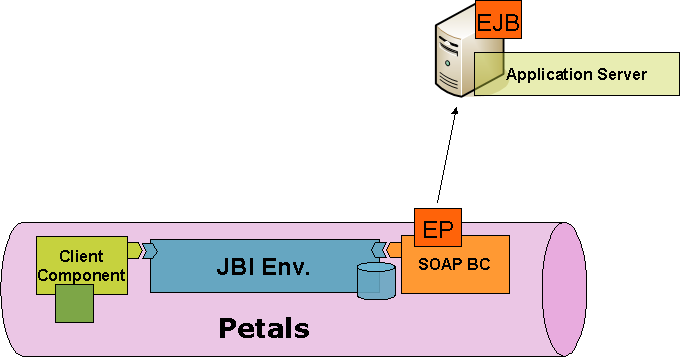
The RMI message is created following these steps :
- The JBI message payload is mapped to Java objects. These objects (and their types) are used as operation parameters for the RMI call. The mapping is done thanks to the PEtALS-JAXB-Databinding library. For more information about XML databinding feel free to read the chapter entitled XML to Java binding.
- The JBI message exchange operation local part is used as the EJB method to invoke.
- If a security subject is provided by the JBI message it is used as authentication information during the RMI invokation.
 | For more information about JAAS read the chapter : JAAS authentication for EJB calls |
In order to reach the remote EJB, the component need to get an RMI stub of the EJB from a JNDI server. The JNDI name of the target EJB is defined in the parameter ejb.jndi.name.
The external EJB is called and the response is processed by the PEtALS-JAXB-Databinding library and then returned to the JBI environment.
Service Unit descriptor
The Service Unit descriptor file ( jbi.xml ) looks like this :
<?xml version="1.0" encoding="UTF-8"?>

<!--
  JBI descriptor for the PEtALS' "petals-bc-ejb" component (EJB).
  Originally created for the version 1.1 of the component.
-->

<jbi:jbi version="1.0"
    xmlns:ejb="http://petals.ow2.org/components/ejb/version-1.1"
    xmlns:generatedNs="http://application.localisation.watersupply.petals.ow2.org/"
    xmlns:jbi="http://java.sun.com/xml/ns/jbi"
    xmlns:petalsCDK="http://petals.ow2.org/components/extensions/version-4.0"
    xmlns:xsi="http://www.w3.org/2001/XMLSchema-instance">

  <!-- Import a Service into PEtALS or Expose a PEtALS Service => use a BC. -->
  <jbi:services binding-component="true">

    <!-- Import a Service into PEtALS => provides a Service. -->
    <jbi:provides
        interface-name="generatedNs:LocalisationFinderBusinessServicePortType"
        service-name="generatedNs:LocalisationFinderBusinessService"
        endpoint-name="LocalisationFinderBusinessServiceEndpoint">

      <!-- CDK specific elements -->
      <petalsCDK:wsdl>Localisation.wsdl</petalsCDK:wsdl>

      <!-- Component specific elements -->
      <ejb:ejb.jndi.name>LocalisationFinderBusinessService</ejb:ejb.jndi.name>
      <ejb:java.naming.factory.initial>org.jnp.interfaces.NamingContextFactory</ejb:java.naming.factory.initial>
      <ejb:java.naming.provider.url>jnp://localhost:1099/</ejb:java.naming.provider.url>
      <ejb:ejb.version>2.1</ejb:ejb.version>
      <ejb:ejb.home.interface>org.ow2.petals.watersupply.localisation.application.LocalisationFinderBusinessServiceRemoteHome</ejb:ejb.home.interface>
      <ejb:marshalling.engine>jaxb</ejb:marshalling.engine>
      <ejb:security.name />
      <ejb:security.principal />
      <ejb:security.credencials />

    </jbi:provides>
  </jbi:services>
</jbi:jbi>
coin
| Parameter | Description |
Default |
Required |
|---|---|---|---|
| provides | Describe the JBI service that will be exposed into the JBI bus. Interface (QName), Service (QName) and Endpoint (String) attributes are required. | - | Yes |
Service Unit content
The service unit must contain a JAR archive including the EJB Interface (and EJB Home Interface for a 2.x EJB) and all specific Java classes used by this interface.
It is also highly recommended to provide a WSDL description of your EJB interface. This WSDL description will be used as Service Description for the JBI Endpoint linked to your EJB.
The directory structure of a SU for the BC-EJB must look like this :
my-su-ejb.zip
   + META-INF
     - jbi.xml
   - my-ejb-wsdl-description.wsdl
   - my-ejb.jar
   - my-ejb-dependency1.jar
   - my-ejb-dependency2.jar
Packaging EJB container RMI client libraries
Since the petals-bc-ejb is a generic binding component that allows to call Enterprise Java Beans running on different kind of application servers, you must add your application specific RMI client libraries to the component classpath. There are three solutions to add the libraries to do so :
- add the libraries directly in the component classpath (bad)
- add the libraries to each deployed service unit (average)
- add the libraries to a shared library deployed before component startup (good)
By default this component uses a shared library called "petals-sl-ejb" which must contains the RMI client libraries of the EJB targeted EJB container with its JEE EJB specification.
A shared library archive may look like this :
petals-sl-ejb.zip
   + META-INF
     - jbi.xml
   - my-ejb-container-rmi-client.jar
   - my-ejb-container-rmi-client-dependency1.jar
   - my-ejb-container-rmi-client-dependency2.jar
   - my-ejb-container-ejb-specification.jar
Adding jar files to the archive is not sufficient. Each jar contained by the shared library must be declared within its JBI descriptor.
Here is an exemple of such files (jbi.xml file) :
<?xml version="1.0" encoding="UTF-8"?>
<jbi:jbi
    xmlns:xsi="http://www.w3.org/2001/XMLSchema-instance"
    xmlns:petals="http://petals.ow2.org/extensions"
    xmlns:jbi="http://java.sun.com/xml/ns/jbi" version="1.0">

  <jbi:shared-library class-loader-delegation="self-first" version="my-ejb-container-versionXYZ">

    <jbi:identification>
      <jbi:name>petals-sl-ejb</jbi:name>
      <jbi:description>SharedLibrary EJB for my-ejb-container-versionXYZ</jbi:description>
    </jbi:identification>

    <jbi:shared-library-class-path>
      <jbi:path-element>my-ejb-container-rmi-client.jar</jbi:path-element>
      <jbi:path-element>my-ejb-container-rmi-client-dependency1.jar</jbi:path-element>
      <jbi:path-element>my-ejb-container-rmi-client-dependency2.jar</jbi:path-element>
      <jbi:path-element>my-ejb-container-ejb-specification.jar</jbi:path-element>
    </jbi:shared-library-class-path>

  </jbi:shared-library>
</jbi:jbi>
Finally, to add this shared library to the component classpath you must add the following section to the JBI descriptor of the component (here with the default shared library for the EJB component) just after the end of the "bootstrap-class-path" element:
<shared-library>petals-sl-ejb</shared-library>
XML to Java binding
Since the JBI message payload is a XML message, the component must provide a way to transform Java objects into XML (marshalling) an XML to Java objects (unmarshalling). The message payload containing an EJB call is unmarshalled to Java objects that will be used as method parameters for the EJB call through RMI. The EJB response is intercepted by the component and then marshalled to an XML payload.
This marshalling / unmarshalling process is provided by the PEtALS-JAXB-Databinding library. This library uses a WSDL file (generated from your service class with Apache-CXF or OW2-Java2EasyWSDL from the EasyWSDL toolbox) to bind Java classes to XML tags.
Request message
The incoming JBI message payload is unmarshalled by JAXB using the WSDL provided in the service unit. XML messages are transformed to Java Objects which are used to perform a RMI call on the EJB.
<?xml version="1.0" encoding="UTF-8"?>
<soapenv:Envelope
    xmlns:soapenv="http://schemas.xmlsoap.org/soap/envelope/"
    xmlns:q0="http://application.localisation.watersupply.petals.ow2.org/"
    xmlns:xsd="http://www.w3.org/2001/XMLSchema"
    xmlns:xsi="http://www.w3.org/2001/XMLSchema-instance">
  <soapenv:Body>
    <q0:getBureauDistributeurInfoByCommuneId>
      <q0:arg0>452</q0:arg0>
    </q0:getBureauDistributeurInfoByCommuneId>
  </soapenv:Body>
</soapenv:Envelope>
Response message
The EJB response is intercepted by the component and then marshalled by JAXB conforming to the provided WSDL.
<?xml version="1.0" encoding="UTF-8"?>
<soapenv:Envelope xmlns:soapenv="http://schemas.xmlsoap.org/soap/envelope/">
  <soapenv:Body>
    <getBureauDistributeurInfoByCommuneIdResponse
        xmlns="http://businessinfo.localisation.watersupply.petals.ow2.org"
        xmlns:ns2="http://application.localisation.watersupply.petals.ow2.org/">
      <ns2:return>
        <BureauDistributeurInfo>
          <code>code 0</code>
          <id>452</id>
          <libelle>libelle 0</libelle>
        </BureauDistributeurInfo>
        <BureauDistributeurInfo>
          <code>code 2</code>
          <id>452</id>
          <libelle>libelle 2</libelle>
        </BureauDistributeurInfo>
        <BureauDistributeurInfo>
          <code>code 3</code>
          <id>452</id>
          <libelle>libelle 3</libelle>
        </BureauDistributeurInfo>
      </ns2:return>
    </getBureauDistributeurInfoByCommuneIdResponse>
  </soapenv:Body>
</soapenv:Envelope>
JAAS authentication
The EJB binding component is JAAS enabled : it can handle security subjects from your JBI platform to your application server to perform authentication and role based EJB method restrictions.
 | Caution When using JAAS (or any security feature) you MUST ensure that all the JVM are compliant. In other words, the JVM running PEtALS MUST be fully compliant with the one running your application server. Both JVM must came from the same vendor, using the same kind of architecture (32 bits or 64 bits), cryptography libraries and so on. |
JAAS configuration
JAAS authentication is based on a configuration file which specifies all the login modules to be used during the authentication process, as shown below.
jonas {
  // Login Module to use for the example jaasclient.

  //First, use a LoginModule for the authentication
  org.ow2.petals.bc.ejb.security.WSSUserPasswordLoginModule required
  org.ow2.petals.users="users.properties"
  org.ow2.petals.roles="roles.properties";

  // Use the login module to propagate security to the JOnAS server
  // globalCtx is set to true in order to set the security context
  // for all the threads of the client container instead of only
  // on the current thread.
  // Useful with multithread applications (like Swing Clients)
  org.objectweb.jonas.security.auth.spi.ClientLoginModule required globalCtx="true";
};
In this file, only one configuration “jonas” (which is the configuration identifier) is defined. You can define several configurations in the same JAAS configuration file.
| Petals ESB must be configured to use this file as default JAAS configuration file at startup. To do so, you must set up the JVM property “java.security.autho.login.config” to the absolute path of your JAAS configuration file.
Assuming that “PETALS_HOME” is an environment variable pointing onto your PEtALS installation folder and your JAAS configuration file is called “jaas.conf” and resides in your Petals installation |
Login module configuration
In your JAAS configuration file you can specify a list of LoginModule, which will be used for the whole authentication process.
| You can write your own LoginModule by implementing the javax.security.auth.spi.LoginModule interface. To do so feel free to read the JAAS LoginModule developer’s guide. |
For instance in the previous JAAS configuration file, two LoginModule were defined. The first one (org.ow2.petals.bc.ejb.security.WSSUserPasswordLoginModule) is used to make the authentication (based on user / password informations) and the second one, (org.objectweb.jonas.security.auth.spi.ClientLoginModule) is used to propagate the LoginContext to the application server (JOnAS).
| LoginModule classes must be included in the service unit. |
JAAS resources
- Sun. JAAS Reference, available online at : http://java.sun.com/javase/6/docs/technotes/guides/security/jaas/JAASRefGuide.html
- Sun. JAAS Tutorials, available online at : http://java.sun.com/javase/6/docs/technotes/guides/security/jaas/tutorials/
- Sun. LoginModule Developer's Guide, available online at : http://java.sun.com/javase/6/docs/technotes/guides/security/jaas/JAASLMDevGuide.html
- Bhattacharjee Rahul. Authentication using JAAS, available online at : http://www.javaranch.com/journal/2008/04/Journal200804.jsp#a6