 E-mail
Component Configuration
Before installing the bc-ejb component, you must check in your ${PETALS_HOME}/conf/server.properties configuration file if the property "petals.classloaders.isolated=true" is set and uncommented. The BC-EJB component need the isolated classloaders to work correctly.
The component can be configured through its JBI descriptor file like this :
<?xml version="1.0" encoding="UTF-8"?>
<jbi:jbi xmlns:xsi="http://www.w3.org/2001/XMLSchema-instance"
    xmlns:petalsCDK="http://petals.ow2.org/components/extensions/version-4.0"
    xmlns:jbi="http://java.sun.com/xml/ns/jbi" version="1.0">

  <jbi:component type="binding-component" component-class-loader-delegation="parent-first">

    <jbi:identification>
      <jbi:name>petals-bc-ejb</jbi:name>
      <jbi:description>an EJB Binding Component sending messages to local or distant EJB instances</jbi:description>
    </jbi:identification>

    <jbi:component-class-name>org.ow2.petals.bc.ejb.EjbBC</jbi:component-class-name>
    <jbi:component-class-path>
      <jbi:path-element/>
    </jbi:component-class-path>
    <jbi:bootstrap-class-name>org.ow2.petals.component.framework.DefaultBootstrap</jbi:bootstrap-classname>
    <jbi:bootstrap-class-path>
      <jbi:path-element/>
    </jbi:bootstrap-class-path>

    <petalsCDK:acceptor-pool-size>5</petalsCDK:acceptor-pool-size>
    <petalsCDK:processor-pool-size>10</petalsCDK:processor-pool-size>
    <petalsCDK:ignored-status>NOTHING_IGNORED</petalsCDK:ignored-status>
    <shared-library>petals-sl-ejb</shared-library>
    <petalsCDK:jbi-listener-class-name>org.ow2.petals.bc.ejb.listener.JBIListener</petalsCDK:jbi-listener-class-name>
  </jbi:component>
</jbi:jbi>
This component doesn't have any specific configuration parameters.
You can customize the component configuration by changing the following common parameters.
 | EJB binding component can only handle outgoing message (JBI -> EJB), so you can't specify an external-listenerclass-name. |
Service Configuration
Send a JBI message to an external EJB
When a JBI message is received on an endpoint linked to an EJB, the message is transformed into a RMI message, then sent to the linked EJB. 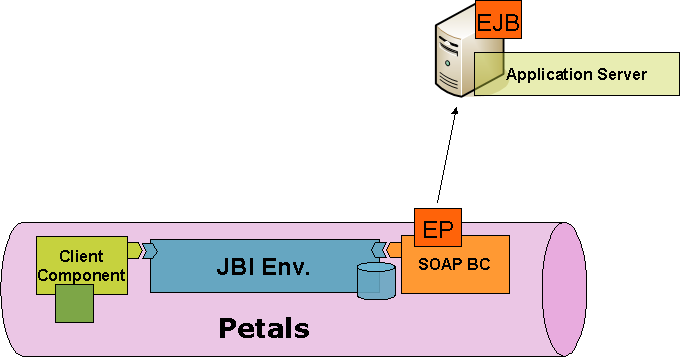
The RMI message is created following these steps :
- The JBI message payload is mapped to Java objects. These objects (and their types) are used as operation parameters for the RMI call. The mapping is done thanks to the PEtALS-JAXB-Databinding library. For more information about XML databinding feel free to read the chapter entitled XML to Java binding.
- The JBI message exchange operation local part is used as the EJB method to invoke.
- If a security subject is provided by the JBI message it is used as authentication information during the RMI invokation.
When a JBI message is received on an endpoint linked to an EJB, the message is transformed into a RMI message, then
sent to the linked EJB.