 E-mail
Features
The FileTransfer component is a Binding Component (BC) which supports file transfers. This component allows to :
- Poll a configured directory for incoming files. At a poll, each file retrieved is put into a new JBI message, set as source or attachment. The message is sent to a target JBI service.
- Provide a standard service that write the JBI message (content and attachments) it receives into a file with a specified name and suffixed with the current date name.
- Provide a dedicated service GetFiles, which describe 2 operations:
- getFiles operation, to retrieve files correponding to a pattern, from a folder.
- getFile operation, to retrieve the first file correponding to a pattern, from a folder.
These operations are described in an embedded astract WSDL, the File Transfer dedicated WSDL.
Component Configuration
Service Configuration
Transfer files into the JBI bus
CONSUME SERVICE : Transfer file(s) from a directory to a JBI service.
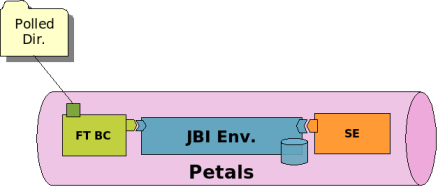
Service Unit descriptor
<?xml version="1.0" encoding="UTF-8"?>
<jbi:jbi version="1.0"
    xmlns:xsi="http://www.w3.org/2001/XMLSchema-instance"
    xmlns:jbi="http://java.sun.com/xml/ns/jbi"
    xmlns:petalsCDK="http://petals.ow2.org/components/extensions/version-4.0"
    xmlns:filetransfer="http://petals.ow2.org/components/filetransfer/version-2.2"
    xmlns:generatedNs="http://petals.ow2.org/filetransfer">

  <jbi:services binding-component="false">
    <jbi:consumes
        interface-name="generatedNs:FileRepo"
        service-name="generatedNs:FileRepoService"
        endpoint-name="getServiceEndpoint">

      <!-- CDK specific fields -->
      <petalsCDK:operation>test</petalsCDK:operation>
      <petalsCDK:mep>InOnly</petalsCDK:mep>

      <!-- FileTransfer specific fields -->
      <filetransfer:read-directory>${PETALS_HOME}/filetransfer/in</filetransfer:read-directory>
      <filetransfer:backup-directory>${PETALS_HOME}/filetransfer/backup</filetransfer:backup-directory>
      <filetransfer:transfer-mode>content</filetransfer:transfer-mode>
      <filetransfer:polling-period>1000</filetransfer:polling-period>
    </jbi:consumes>
  </jbi:services>
</jbi:jbi>
Consumer restrictions
The FileTransfer component supports only InOnly message exchange pattern as consumer.
The FileTransfer component does not support synchronous sendings as consumer.
Consumer usage
If you want to invoke a service in the JBI bus with files, put the files in the configured directory (read-directory). Ateach configured polling period (polling-period), the component fetchs the incoming files.If you want to invoke a service in the JBI bus with files, put the files in the configured directory (read-directory). At each configured polling period (polling-period), the component fetchs the incoming files.For each received files and according to the transfer mode (transfer-mode), the component creates a new message exchange and attachs the file, either as source or as attachment.
If a file is put as a attachment, the name of the attachment is set to the name of the file, and in the source of the message exchange, the component put a XML structure like following :
<attached-files><file-name>myFileName</file-name><attached-files>
The resulted message exchange(s) are sent to the target endpoint.
During the transfer, if the backup directory (backup-directory) is set, the transfered file is moved into it and never deleted by the component. Otherwise the file is moved to the system temporary directory.
When deploying a service unit like in the previous code snippet, all the files put in the directory $PETALS_HOME/filetransfer/in would be set as the payload of an invocation to the FileService service.
Transfer files out of the JBI bus
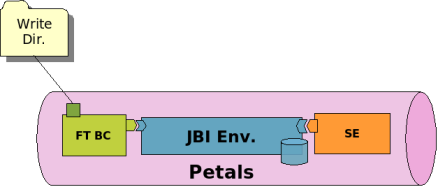
Service Unit descriptor
Provider restrictions
The FileTransfer component only supports InOnly message exchange pattern as service provider.
Provider Usage
According to the configured mode (copy-mode), the XML message content, attachments or both are transfered to the target
directory (write-directory).
According to the configured mode (copy-mode), the XML message content, attachments or both are transfered to the target directory (write-directory).
If the received message is an XML content, the name of the created file would be either the configured file pattern (file-pattern), the operation of the message exchange, or the default name content.xml.
If the received message contains attachments, the name of the created files would be the names of the attachments.
For each file created, the system date is appended to this file name.
When deploying a service unit like in the previous code snippet, all the JBI messages received on the putService service will produce files in the $PETALS_HOME/filetransfer/out directory.
Retrieve files from a folder : the GetFiles service
Service Unit descriptor
<?xml version="1.0" encoding="UTF-8"?>
<jbi:jbi version="1.0"
    xmlns:xsi="http://www.w3.org/2001/XMLSchema-instance"
    xmlns:jbi="http://java.sun.com/xml/ns/jbi"
    xmlns:petalsCDK="http://petals.ow2.org/components/extensions/version-4.0"
    xmlns:filetransfer="http://petals.ow2.org/components/filetransfer/version-2.2"
    xmlns:generatedNs="http://petals.ow2.org/filetransfer">
  <jbi:services binding-component="true">

    <jbi:provides
        interface-name="generatedNs:put"
        service-name="generatedNs:putService"
        endpoint-name="putServiceEndpoint">

      <!-- WSDL file -->
      <petalsCDK:wsdl xsi:nil="true" />

      <!-- FileTransfer specific fields -->
      <filetransfer:write-directory>${PETALS_HOME}/filetransfer/out</filetransfer:write-directory>
      <filetransfer:copy-mode>content-only</filetransfer:copy-mode>
      <filetransfer:file-pattern>test.xml</filetransfer:file-pattern>
    </jbi:provides>
  </jbi:services>
</jbi:jbi>
Provider restrictions
The FileTransfer component supports only InOut or InOptionalOut message exchange pattern as service provider.
Provider Usage
GetFile operation
When the getFile operation is set on the incoming message exchange, the component returns the first file found in the configured directory, according to the file filter set in the XML request (the source of the IN message). The file is returned as an XML response message (OUT message), so the file MUST be an XML file !
The IN message looks like :
<q0:getFile xmlns:q0="http://petals.ow2.org/components/filetransfer/version-2.2">
  <q0:filepattern>*.xml</q0:filepattern>
</q0:getFile>
The OUT message returned to the consumer contains the XML content of the first file matching the pattern, in its source :
The read file is moved to the configured backup directory (backup-directory) or in the system default temporary directory.
 | This operation is defined in the File Transfer abstract WSDL. You can import this abstract WSDL and define a concret WSDL to reference in your SU. Thus the service provided is properly defined by its WSDL. |
GetFiles operation
When the getFiles operation is set on the incoming message exchange, the component returns all the files file found in
the configured directory (read-directory), according to the files filters set in the XML request. The files are all returned
as attachments. An XML report message is returned.
When the getFiles operation is set on the incoming message exchange, the component returns all the files file found in the configured directory (read-directory), according to the files filters set in the XML request. The files are all returned as attachments. An XML report message is returned.
The IN message looks like :
<q0:getFiles xmlns:q0="http://petals.ow2.org/components/filetransfer/version-2.2">
  <q0:filepattern>*.xml</q0:filepattern>
  <q0:filepattern>picture.jpg</q0:filepattern>
  <q0:filepattern>document??.doc</q0:filepattern>
</q0:getFiles>
The OUT message returned to the consumer is defined as follow :
<q0:getFilesResponse xmlns:q0="http://petals.ow2.org/components/filetransfer/version-2.2">
  <q0:filename>file1.xml</q0:filename>
  <q0:filename>file2.xml</q0:filename>
  <q0:filename>picture.jpg</q0:filename>
  <q0:filename>document_1.doc</q0:filename>
  <q0:filename>document_2.doc</q0:filename>
</q0:getFilesResponse>
Files are returned as attachments.
The read files are moved to the configured backup directory (backup-directory) or in the system default temporary directory.
| This operation is defined in the File Transfer abstract WSDL. You can import this abstract WSDL and define a concret WSDL to reference in your SU. Thus the service provided is properly defined by its WSDL. |